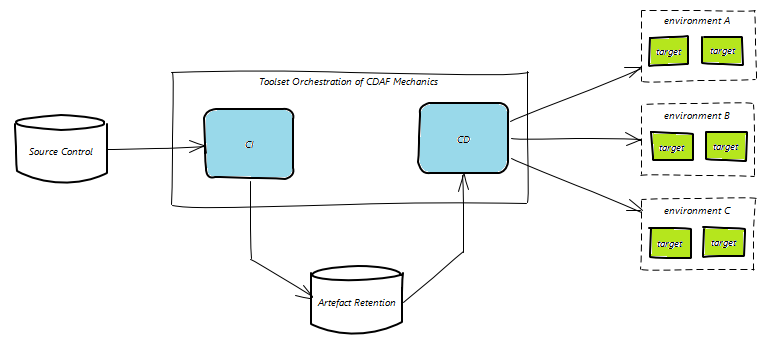
This documentation works through increasingly complex use cases. It is discouraged to open the CDAF code and try to determine its purpose from the code (although it’s open source, so you’re most welcome). The framework uses a significant amount of dependency injection, and without an understanding of the purpose, the code will be quite difficult to follow.
What CDAF isn’t
What CDAF is
The Continuous Delivery Automation Framework Does not give you DevOps
The Continuous Delivery Automation Framework is optionated to help you achieve DevOps principles for Continuous Delivery
CDAF is not a replacement of your CI/CD orchestration tool.
CDAF is loosely coupled, allowing you to test your automation before executing in your orchestration tool.
It does not replace your build tools, such as MSBuild, Maven, Ant, etc.
It provides an execution engine for your build tasks, to cater for logging, error and exception handling.
CDAF does not know how to deploy your application nor; does it know how to manage the configuration.
CDAF provides delivery helpers for common deployment tasks. A tabular abstraction engine is provided to support tokenised configuration files
Geared for Enterprise DevOps
The framework origin is within Enterprises, deploying production systems for internal and external consumption. Although CDAF is used for product shipping, i.e. the framework is used to deliver itself, this is not its primary purpose.
Framework Principles
CDAF provides consistency in the solution build, package and delivery mechanics, providing the basis of a code driven delivery, whereby any changes to the methodology are traceable in the source control system. While CDAF focusses on the mechanics of Continuous Delivery, the CI Tools are relied upon for source control integration, artefact retention and providing a graphical user interface for features such as reviewing automated test results and release gating.
Common Denominators
The following are core capabilities of CI/CD orchestration tools, which are factored into the CDAF design.
Git
Source Control in all the documentation is oriented to Git. There is nothing limiting the use of the framework with other source control systems at all because it is loosely coupled, however, there are considerable additional features which work best with Git.
Build Artefacts
The results of the CI process can be retained and re-used in deployment process. This basic capability is critical to embrace the build-once/deploy-many principle.
Agents
CI/CD orchestration tools execute the task workload on Agents. There are a broad range of implementation styles, especially with regards to how the agents communicate with the server, and how tasks are distributed to agents, but the principle is largely the same.
some agents are obfuscated from the users, and others will execute tasks in isolated containers on the agent, which will be explored in more detail in the Containers section.
Pipelines
The capability of the CI/CD orchestration tools to decouple the CI and CD functions, with the CD operations being completely independent of source control. See starting with a do nothing pipeline.
Gating
As CDAF is geared toward enterprises, promotion to production is typically gated (Continuous Delivery) with Continuous Deployment being uncommon, therefore in this material, CD is a reference to Continuous Delivery unless otherwise stated.
Subsections of CDAF
Getting Started
Getting Started
The following guidance is language independent, i.e. does not require a development environment, and simply uses scripts to reflect a deliverable.
Continuous Integration (CI) is a critical prerequisite of Continuous Delivery/Deployment (CD).
Create a Release Package
To allow the execution of the build and package (CI) process on the DevOps Engineers machine, CDAF is used for both loose coupling and standardisation. CDAF provides a variety of features which provide consistency, especially important and the number of pipelines grow and the team members move between both squads and value streams.
Install on Windows
To install to current directory, recommend placing in your home directory, or download latest zip.
CDAF providers 4 entry scripts for different purposes.
ci : Build and Package only, i.e. Continuous Integration, mandatory argument is BUILDNUMBER
cd : Release, i.e. Continuous Delivery or Deploy (depending on gating or not), mandatory argument is ENVIRONMENT
cdEmulate : Executes ci and then cd, generates BUILDNUMBER if not supplied and uses configurable ENVIRONMENT
entry : Executes ci and then cd, generates BUILDNUMBER if not supplied and uses configurable ENVIRONMENT(s)
Release Package Creation
With the focus being delivery, not development, the creation of a consistent, self contained release package is a core CDAF feature used for both component delivery and stand-up/tear-down capabilities. The output of the CDAF CI processs is a single release.ps1 file. See Self-extracting release article.
A key principle of the Continuous Delivery Automation Framework is loose coupling. This gives the automation developer the ability to run the automation process on their workstation, well before executing in the pipeline tooling. This principle should be retained where possible so that troubleshooting and feature development can be brought closer to the developer.
a loosely coupled solution can allow migrating from one pipeline tool to another with minimal effort.
Seed your solution
To seed a new solution, the minimal requirement is a directory with a solution file CDAF.solution
The minimum properties are the name of your solution, and the versioning prefix. The resulting artefact will have the build number appended to the release package, e.g. the first build will be 0.1.1, then 0.1.2 and so on.
solutionName=mycoolproductartifactPrefix=0.1
Continuous Integration (CI)
With CDAF installed on your path, you can now test the solution by running the Continuous Integration entry point
linux
ci.sh
windows
ci
Many things will happen, however the key observation is that a file called release.sh for linux or release.ps1 for windows will be produced, this is the build artefact that can be consumed by the Continuous Delivery (CD) stages. See minimal sample for an executed example.
Shift-Left & Fail-Fast
Now that you have the bare minimum, apply it to your CI/CD toolset immediately. We want to have a green pipeline from the start to trap any problems we may introduce in subsequent steps.
CDAF provides a loose coupling for core CI & CD objectives. The intention is that the CI & CD processing is performed on the developers desktop, and then executed in the same way in the pipeline tool. By establishing a healthy pipeline as soon as possible, any pipeline failures can be quickly and incrementally identified. See Entering Sprint-0 for elaboration.
Pipeline Orchestration and Capabilities
The CI process gathers files from source control, then uses the CDAF CI entry point to produce the release package. The pipeline tool then stores the release package for reuse in subsequent deploy processes.
graph LR
  subgraph CI
    git[("Source Control")]
    bp["Build & Package"]
    registry[("Artefact Store")]
  end
  qa["✓ qa"]
  pp["✅ pp"]
  pr["✅ pr"]

  git -->
  bp -->
  registry -->
  qa -->
  pp -->
  pr

classDef dashed stroke-dasharray: 2
class CI dashed
After the CI process, the pipeline tool may perform additional value add processes that are not directly related to delivery, i.e. publishing test results or code coverage.
The pipeline then retrieves the release package, and then triggers one or more deployments to promote a release to production. This is the CD process.
graph LR
  git[("Source Control")]
  bp["Build & Package"]
  subgraph CD
    registry[("Artefact Store")]
    qa["✓ qa"]
    pp["✅ pp"]
    pr["✅ pr"]
  end

  git -->
  bp -->
  registry -->
  qa -->
  pp -->
  pr

classDef dashed stroke-dasharray: 2
class CD dashed
The triggering of each stage of the promotion can be immediate (indicated with ✓ in the diagram above) or require a manual approval (✅), but it is expected the deployment process itself is fully automated once it has been triggered.
Using the seeded solution from the previous material, it is recommended that this is executed in your pipeline as a do nothing verification. See the orchestration examples in GitHub for guidance:
Continuous Integration (CI) is the objective of bringing code branches together and building them to produce a consolidated artefact. This shift-left approach ensures the efforts of multiple contributors are combined and tested regularly. The testing within CI typically starts with unit testing, and that should be included in the build task. For some ecosystems this is an implicit or parameterised part of the build command, others, it’s separate command.
How does it work
CDAF will process all build.tsk files in the solution root, then all the build.tsk files found in one level of sub-directories.
The build.tsk files are processed line by line, each line is logged and then executed, with errors and exceptions trapped and logged. In the case of linux the error processing is based on the exit code and standard error, while windows has a broader range of errors, such as halt and exception conditions.
For this material, the build output is a simple script, for some language specific examples see:
Set-Content build.tsk 'Set-Content runtime.ps1 "Write-Host `"Deploy %integer%, property set to : %property%`""'Add-Content build.tsk 'REFRSH runtime.ps1 output'
Continuous Integration (CI)
The build.tsk is a CI task so only need to execute
ci.sh
or for windows
ci
The build process will now be triggered, this can be observed in the log build.tsk found in solution root, this will produce a directory called output, however, this will not be included in the release file, which will be covered in the next step.
Package
Now that build artefact has been created, create a deployable package.
An objective of Continuous Delivery is to have a predictable, repeatable, deployment process. A fundamental principle of CDAF to achieve this producing an immutable release package. This decouples the deployment process from the source management process. The release package is a self-contained deployment asset, and should be executable anywhere, i.e. on the automation developers desktop, within the pipeline or even manually file transferred to a remote server.
Artefact Retention
In the Configuration Management step, a default release package was created which contained properties files. The following step defines the solution specific artefacts which need to be available at deploy time. These are typically compiled binaries, but can be any set of files and/or directories.
Retain the output from the previous build task.
Linux
echo 'output' > .cdaf/storeForLocal
Windows
Set-Content .\.cdaf\storeForLocal 'output'
Build & Deploy
Use the continuous deployment emulation entry point.
cdEmulate : Executes ci and then cd, generates BUILDNUMBER if not supplied and uses configurable ENVIRONMENT
Linux
cdEmulate.sh
windows
cdEmulate
Inspect the directory TasksLocal, and will now contain the output directory produced by the build task. Test the artefact
Linux
./TasksLocal/output/runtime.sh
windows
.\TasksLocal\output\runtime.ps1
This should output the following:
Deploy %integer%, property set to : %property%
Other File Locations
There are three artefact definitions file names, depending on context, local, remote or both:
storeFor
storeForLocal
storeForRemote
Other directories within your solution directory which will also be automatically included in the root of your deployment directory. Based on the suffix these will be placed in a local context, remote context or both. See the following sections for how these contexts differ.
crypt
cryptLocal
cryptRemote
custom
customLocal
customRemote
An explanation of the local and container extensions will be explained in following sections.
Continuous Delivery/Deployment
Deploy the artefact using the created package, along with Configuration Management.
Continuous Integration (CI) is a critical prerequisite of production-like stand-up/tear-down, i.e. if it can’t be build on the engineers machine, it can’t be deployed from the engineers machine.
Configuration Management and Automated Deployment
Configuration Management
CDAF origin was to ensure consistent configuration of servers across environments, based on a source of truth. The partner construct to this approach is tokenisation, i.e. a way of abstracting environment variations away from the syntax of the consuming application.
Tabular Properties
To provide a human readable, single pane-of-glass view of the multiple environment configurations, a tabular approach is used. An example of this follows. The first two columns, context and target are mandatory, all others can be any values needed for your solution.
context  target  property
local    TEST    test.server.comain
local    PROD    production.server.domain
Configuration Management files should never container sensitive data or secrets. These are supplied as variables, see more on sensitive data strategies.
The configuration management tables can be any file name with .cm extension, in your solution root. All .cm files are processed prior to the build task in the CI process.
Extend the Seeded Solution
Based on the seeded solution, add a properties.cm file to the solution root.
Retest your solution, but this time, execute the end-to-end process
Linux
cdEmulate.sh
Windows
cdEmulate
The resulting CD process will not perform any action, however, the release package will now be extracted and there will be a directory TasksLocal, and in this will be the sub-directory based on the property context, propertiesForLocalTasks. In this directory will be the two properties files, compiled from the properties.cm file, TEST and PROD respectively, e.g.
property=Test Property
integer=1
Tokenisation
The partner files in source control are in whatever syntax required by the application, with tokens only for values that vary between environment. By default, tokens are in the form %name%. Following examples highlight how the configuration management is intended to provide an abstraction from the complexities of the application configuration files.
Local Tasks use the same execution engined as build tasks, but at deploy time, rather than build time. Local Tasks are executed in the local context of the host/server. Local Tasks are suited to situations where the agent is installed on the server where tasks are to be performed, or the server that the agent/runner is installed has the tools required to perform tasks on a remote target, i.e. a service offering with a command line interface, such as Kubernetes, Azure or AWS.
The CDAF capabilities with containers cater for more sophisticated uses in the local context and the alternative container tasks execution approach.
Example Task
The default tasks that are run in the local context are tasksRun.tsk and tasksRunLocal.tsk. These are placed in your solution root.
Two steps are performed, first the deployable artefact is detokenised
Found %property%, replacing with Local Context
Found %integer%, replacing with 1
Then executed to verify the environment specific properties.
Deploy 1, property set to : Local Context
This now completes an end-to-end example of CDAF, from configuration management, build & package through to deployment. Following are some common additional configuration elements, and the final step covers the increasingly less common pattern of Remote tasks.
Alternate Tasks
If you require a variety of tasks, you can explicitly define them, which will ignore any tasksRun.tsk and tasksRunLocal.tsk in your solution root. Please your task files in directory named either custom or customLocal in your solution root.
To map your configuration to the alternate tasks, you must use the column name deployTaskOverride.
context  target  deployTaskOverride     databaseFQDN        dBpassword
local    TEST    simple-db-deploy.tsk   db1.nonprod.local   $db1Pass
local    UAT     simple-db-deploy.tsk   $db2Pass
local    PROD    cluster-db-deploy.tsk  $prodPass
Remote Tasks
Tasks run in a remote context. This approach is less common with the license barriers to installing deployment agents, and the client oriented nature of modern agents, making the need for push deployments less common.
Like Local Tasks, Remote Tasks use the same execution engined as build tasks, but at deploy time, rather than build time. Remote Tasks are executed in the local context of a remote host/server. Remote Tasks are suited to situations where the agent is not installed on the server where tasks are to be performed and instead the deployment is pushed, i.e. to an application server in the DMZ which can only be accessed by Remote PowerShell or SSH.
The Remote Task is executed in a local context, so all the processes described in Local Tasks, however, how the deployment package is made available to the execution engine differs, along with pre-execution steps to make execution on the remote host possible.
SSH/SCP or Remote PowerShell with custom file transfer
Remote PowerShell for Windows or SSH/SCP for Linux are the protocols used to transfer the Remote Task package to the remote host for execution. PowerShell does not have an file transport protocol (Windows is typically reliant on SMB) so a CDAF feature has be provided to allow a file transfer mechanism similar to SCP in Linux.
Nested Package
When using Remote Tasks, a reduced set of CDAF helper scripts are packed into a nested compressed file. This file is transferred to the remote host and then unpacked. Once unpacked, the properties for the current release environment are transferred to remote host, and then the deployment is executed.
Remote Task Configuration
The default authentication for transferring the remote files is pre-shared keys for Linux and domain service principle for Windows, however, alternative authentication methods are supported.
Minimal build will produce a single build output, release.ps1.
[cdEmulate.bat] --------------------
[cdEmulate.bat] Initialise Emulation
[cdEmulate.bat] --------------------
[cdEmulate.ps1]   ACTION              : (not supplied, options cionly, buildonly, packageonly or cdonly)
[cdEmulate.ps1]   BUILDNUMBER         : 773 (auto incrimented from C:\Users\vagrant\BUILDNUMBER.counter)
[cdEmulate.ps1]   REVISION            : release
[cdEmulate.ps1]   AUTOMATIONROOT      : C:\automation (default)
[cdEmulate.ps1]   SOLUTIONROOT        : C:\minimal\automation-solution (found C:\minimal\automation-solution\CDAF.solution)
[cdEmulate.ps1]   SOLUTION            : minimal-package (from C:\minimal\automation-solution\CDAF.solution)
[cdEmulate.ps1]   CDAF_DELIVERY       : WINDOWS (derived from domain membership)
[cdEmulate.ps1]   ciProcess           : C:\automation\processor\buildPackage.ps1 (default)
[cdEmulate.ps1]   cdProcess           : .\release.ps1 (default)

[buildPackage.ps1] ============================================
[buildPackage.ps1] Continuous Integration (CI) Process Starting
[buildPackage.ps1] ============================================
[buildPackage.ps1]   BUILDNUMBER     : 773
[buildPackage.ps1]   REVISION        : release
[buildPackage.ps1]   ACTION          :
[buildPackage.ps1]   LOCAL_WORK_DIR  : TasksLocal (default)
[buildPackage.ps1]   REMOTE_WORK_DIR : TasksRemote (default)
[buildPackage.ps1]   AUTOMATIONROOT  : C:\automation (not supplied, derived from invocation)
[buildPackage.ps1]   SOLUTIONROOT    : C:\minimal\automation-solution
[buildPackage.ps1]   SOLUTION        : minimal-package (found $SOLUTIONROOT\CDAF.solution)
[buildPackage.ps1]   BUILDENV        : WINDOWS (derived from domain membership)
[buildPackage.ps1]   WORKSPACE_ROOT  : C:\minimal
[buildPackage.ps1]   hostname        : HP-800-G1
[buildPackage.ps1]   whoami          : vagrant
[buildPackage.ps1]   CDAF Version    : 3.0.0
[buildPackage.ps1]   Pre-build Task  : none (C:\minimal\automation-solution\prebuild.tsk)
[buildPackage.ps1]   Post-build Task : none (C:\minimal\automation-solution\postbuild.tsk)
[buildPackage.ps1]   CM Driver       : none (C:\minimal\automation-solution\*.cm)
[buildPackage.ps1]   PV Driver       : none (C:\minimal\automation-solution\*.pv)

[buildPackage.ps1] Remove Build Process Temporary files and directories

[buildPackage.ps1] CDAF Container Features Set ...
[buildPackage.ps1]   containerBuild            : (not defined in C:\minimal\automation-solution\CDAF.solution)

[06/28/2025 16:27:20] & "C:\automation\buildandpackage\buildProjects.ps1" minimal-package 773 release "C:\automation" "C:\minimal\automation-solution"

[buildProjects.ps1] +----------------------------+
[buildProjects.ps1] | Process BUILD all projects |
[buildProjects.ps1] +----------------------------+
[buildProjects.ps1]   SOLUTION          : minimal-package
[buildProjects.ps1]   BUILDNUMBER       : 773
[buildProjects.ps1]   REVISION          : release
[buildProjects.ps1]   AUTOMATIONROOT    : C:\automation
[buildProjects.ps1]   SOLUTIONROOT      : C:\minimal\automation-solution
[buildProjects.ps1]   ACTION            :
[buildProjects.ps1]   BUILDENV          : WINDOWS
[buildProjects.ps1]   Project list      : none (C:\minimal\automation-solution\buildProjects)

[buildProjects.ps1] Load solution properties ...

[Transform.ps1] PROPFILE  : C:\minimal\automation-solution\CDAF.solution
[Transform.ps1]   productName = Minimal Release Package
[Transform.ps1]   solutionName = minimal-package
[Transform.ps1]   artifactPrefix = 0.0
[Transform.ps1]   packageFeatures = minimal
[Transform.ps1]   packageMethod = tarball
[Transform.ps1]   processSequence = localTasks.ps1

[buildProjects.ps1] Clean temp files and folders from workspace
[buildProjects.ps1] Delete .\*.tar.gz

[buildProjects.ps1] No project directories found containing build.ps1 or build.tsk, assuming new solution, continuing ...

[06/28/2025 16:27:20] & "C:\automation\buildandpackage\package.ps1" minimal-package 773 release "C:\automation" "C:\minimal\automation-solution" TasksLocal TasksRemote

[package.ps1] +-----------------+
[package.ps1] | Package Process |
[package.ps1] +-----------------+
[package.ps1]   SOLUTION                   : minimal-package
[package.ps1]   BUILDNUMBER                : 773
[package.ps1]   REVISION                   : release
[package.ps1]   AUTOMATIONROOT             : C:\automation
[package.ps1]   SOLUTIONROOT               : C:\minimal\automation-solution
[package.ps1]   LOCAL_WORK_DIR             : TasksLocal
[package.ps1]   REMOTE_WORK_DIR            : TasksRemote
[package.ps1]   ACTION                     :
[package.ps1]   Prepackage Tasks           : none (C:\minimal\automation-solution\package.tsk)
[package.ps1]   Prepackage Script          : none (.\package.ps1)
[package.ps1]   Postpackage Tasks          : none (C:\minimal\automation-solution\wrap.tsk)
[package.ps1]   Remote Target Directory    : none (C:\minimal\automation-solution\propertiesForRemoteTasks)
[package.ps1]   Container Target Directory : none (C:\minimal\automation-solution\propertiesForContainerTasks)
[package.ps1]   pwd                        : C:\minimal
[package.ps1]   hostname                   : HP-800-G1
[package.ps1]   whoami                     : vagrant
[package.ps1]   CDAF Version               : 3.0.0
[package.ps1]   packageFeatures            : minimal (option minimal)

[package.ps1]   --- Start Package Process ---

[package.ps1] Delete TasksLocal

[package.ps1] Load solution properties from C:\minimal\automation-solution\CDAF.solution

[Transform.ps1] PROPFILE  : C:\minimal\automation-solution\CDAF.solution
[Transform.ps1]   productName = Minimal Release Package
[Transform.ps1]   solutionName = minimal-package
[Transform.ps1]   artifactPrefix = 0.0
[Transform.ps1]   packageFeatures = minimal
[Transform.ps1]   packageMethod = tarball
[Transform.ps1]   processSequence = localTasks.ps1

Created manifest.txt file ...

# Manifest for revision minimal-package
SOLUTION=minimal-package
BUILDNUMBER=773
REVISION=release
productName=Minimal Release Package
solutionName=minimal-package

artifactPrefix=0.0
packageFeatures=minimal
packageMethod=tarball

processSequence=localTasks.ps1

[package.ps1] Always create local working artefacts, even if all tasks are remote
[06/28/2025 16:27:20] & 'C:\automation\buildandpackage\packageLocal.ps1' 'minimal-package' '773' 'release' 'TasksLocal' 'C:\minimal\automation-solution' 'C:\automation'

[packageLocal.ps1] ---------------------------------------------------------------
[packageLocal.ps1]   WORK_DIR_DEFAULT                : TasksLocal
[packageLocal.ps1]   Local Artifact List             : none (C:\minimal\automation-solution\storeForLocal)
[packageLocal.ps1]   Generic Artifact List           : none (C:\minimal\automation-solution\storeFor)
[packageLocal.ps1]   Local Tasks Properties List     : none (C:\minimal\automation-solution\propertiesForLocalTasks)
[packageLocal.ps1]   Generated local properties      : none (propertiesForLocalTasks)
[packageLocal.ps1]   Local Environment Properties    : none (C:\minimal\automation-solution\propertiesForLocalEnvironment)
[packageLocal.ps1]   Local Tasks Encrypted Data      : none (C:\minimal\automation-solution\cryptLocal)
[packageLocal.ps1]   Common Encrypted Data           : none (C:\minimal\automation-solution\crypt)
[packageLocal.ps1]   Local Tasks Custom Scripts      : none (C:\minimal\automation-solution\customLocal)
[packageLocal.ps1]   Common Custom Scripts           : none (C:\minimal\automation-solution\custom)
[packageLocal.ps1]   Remote Tasks Properties List    : none (C:\minimal\automation-solution\propertiesForRemoteTasks)
[packageLocal.ps1]   Generated remote properties     : none (propertiesForRemoteTasks)
[packageLocal.ps1]   Container Tasks Properties List : none (C:\minimal\automation-solution\propertiesForContainerTasks)
[packageLocal.ps1]   Generated Container properties  : none (propertiesForContainerTasks)

[packageLocal.ps1] Create TasksLocal and seed with solution files
[packageLocal.ps1]   .\manifest.txt --> TasksLocal
[packageLocal.ps1]   C:\automation\CDAF.windows --> TasksLocal\CDAF.properties
[packageLocal.ps1]   C:\automation\processor\delivery.bat --> TasksLocal
[packageLocal.ps1]   C:\automation\processor\delivery.ps1 --> TasksLocal

[packageLocal.ps1] packageFeatures = minimal
[packageLocal.ps1]   C:\automation\remote\getProperty.ps1 --> TasksLocal
[packageLocal.ps1]   C:\automation\local\localTasks.ps1 --> TasksLocal
[packageLocal.ps1]   C:\automation\local\localTasksTarget.ps1 --> TasksLocal
[packageLocal.ps1]   C:\automation\remote\execute.ps1 --> TasksLocal
[packageLocal.ps1]   C:\automation\remote\Transform.ps1 --> TasksLocal

[packageLocal.ps1] Copy local and remote definitions

[packageLocal.ps1]   No files found for tasksRunLocal.tsk tasksRunRemote.tsk

[packageLocal.ps1] zipLocal property not found in manifest.txt (CDAF.solution), no further action required.

[package.ps1] Remote Properties directory (C:\minimal\automation-solution\propertiesForRemoteTasks) or storeForRemote file do not exist, no action performed for remote task packaging

[package.ps1]   --- Package Complete ---
[buildPackage.ps1] artifactPrefix = minimal-package-0.0.773, generate single file artefact ...
[buildPackage.ps1]   Created C:\minimal\minimal-package-0.0.773
[06/28/2025 16:27:20] Move-Item '.\TasksLocal' '.\minimal-package-0.0.773'
[06/28/2025 16:27:20] cd minimal-package-0.0.773
[06/28/2025 16:27:20] tar -czf ../minimal-package-0.0.773.tar.gz .
[06/28/2025 16:27:21] cd ..
[buildPackage.ps1]   Create single script artefact release.ps1
[06/28/2025 16:27:21] Created release.ps1, MB : 0.0172100067138672

[buildPackage.ps1] Clean Workspace...
[buildPackage.ps1] Delete manifest.txt
[buildPackage.ps1] Delete minimal-package-0.0.773.tar.gz
[buildPackage.ps1] Delete minimal-package-0.0.773

[buildPackage.ps1][06/28/2025 16:27:21] Process complete, artefacts [release.ps1] placed in C:\minimal
cdEmulate.bat executes the CI process above, and then automatically starts the default deploy process, WINDOWS for domain joined machines, or WORKGROUP for those that are not.
Minimal build will produce a single build output, release.sh.
[cdEmulate.sh] --------------------
[cdEmulate.sh] Initialise Emulation
[cdEmulate.sh] --------------------
[cdEmulate.sh]   ACTION         : (not supplied, options cionly, buildonly, packageonly or cdonly)
[cdEmulate.sh]   BUILDNUMBER    : 104
[cdEmulate.sh]   REVISION       : release
[cdEmulate.sh]   AUTOMATIONROOT : /automation (derived from invocation)
[cdEmulate.sh]   SOLUTIONROOT   : /minimal/automation-solution (CDAF.solution found)
[cdEmulate.sh]   SOLUTION       : minimal-package (from CDAF.solution)
[cdEmulate.sh]   CDAF_DELIVERY  : LINUX (default)
[cdEmulate.sh]   ciProcess      : /automation/processor/buildPackage.sh (default)
[cdEmulate.sh]   cdProcess      : ./release.sh (due to artifactPrefix being set in /minimal/automation-solution/CDAF.solution)

[buildPackage.sh] ============================================
[buildPackage.sh] Continuous Integration (CI) Process Starting
[buildPackage.sh] ============================================
[buildPackage.sh]   BUILDNUMBER     : 104
[buildPackage.sh]   REVISION        : release
[buildPackage.sh]   ACTION          :
[buildPackage.sh]   LOCAL_WORK_DIR  : TasksLocal (default)
[buildPackage.sh]   REMOTE_WORK_DIR : TasksRemote (default)
[buildPackage.sh]   AUTOMATIONROOT  : /automation
[buildPackage.sh]   SOLUTIONROOT    : /minimal/automation-solution
[buildPackage.sh]   SOLUTION        : minimal-package (from CDAF.solution)
[buildPackage.sh]   BUILDENV        : LINUX (default)
[buildPackage.sh]   WORKSPACE_ROOT  : /minimal
[buildPackage.sh]   hostname        : HP-800-G1
[buildPackage.sh]   whoami          : vagrant
[buildPackage.sh]   CDAF Version    : 3.0.0
[buildPackage.sh]   Pre-build Task  : none (/minimal/automation-solution/prebuild.tsk)
[buildPackage.sh]   Post-build Task : none (/minimal/automation-solution/postbuild.tsk)
[buildPackage.sh]   CM Driver       : none (/minimal/automation-solution/*.cm)
[buildPackage.sh]   PV Driver       : none (/minimal/automation-solution/*.pv)

[buildPackage.sh] Remove Build Process Temporary files and directories

[buildProjects.sh] +----------------------------+
[buildProjects.sh] | Process BUILD all projects |
[buildProjects.sh] +----------------------------+

[buildProjects.sh]   SOLUTION       : minimal-package
[buildProjects.sh]   BUILDNUMBER    : 104
[buildProjects.sh]   REVISION       : release
[buildProjects.sh]   ACTION         : (not passed)
[buildProjects.sh]   BUILDENV       : LINUX
[buildProjects.sh]   AUTOMATIONROOT : /automation (global variable)
[buildProjects.sh]   SOLUTIONROOT   : /minimal/automation-solution (global variable)

[buildProjects.sh] Load properties from /minimal/automation-solution/CDAF.solution
  export  productName='Minimal Release Package'
  export  solutionName='minimal-package'
  export  artifactPrefix='0.0'
  export  packageFeatures='minimal'
  export  processSequence='localTasks.sh'
/automation/buildandpackage/buildProjects.sh: line 105: warning: command substitution: ignored null byte in input

[buildProjects.sh] No projects found, no build action attempted.

[package.sh] +-----------------+
[package.sh] | Package Process |
[package.sh] +-----------------+
[package.sh]   SOLUTION                 : minimal-package
[package.sh]   BUILDNUMBER              : 104
[package.sh]   REVISION                 : release
[package.sh]   LOCAL_WORK_DIR           : TasksLocal
[package.sh]   REMOTE_WORK_DIR          : TasksRemote
[package.sh]   ACTION                   :
[package.sh]   AUTOMATIONROOT           : /automation
[package.sh]   SOLUTIONROOT             : /minimal/automation-solution
[package.sh]   Pre-package Tasks        : none (/minimal/automation-solution/package.tsk)
[package.sh]   Post-package Tasks       : none (/minimal/automation-solution/wrap.tsk)
[package.sh]   Remote Target Directory  : none (/minimal/automation-solution/propertiesForRemoteTasks)
[package.sh]   remote artifact list     : none (/minimal/automation-solution/storeForRemote)
[package.sh]   Remote Target Directory  : none (/minimal/automation-solution/propertiesForContainerTasks)
[package.sh]   generic artifact list    : none (/minimal/automation-solution/storeFor)
[package.sh]   pwd                      : /minimal
[package.sh]   hostname                 : HP-800-G1
[package.sh]   whoami                   : vagrant
[package.sh]   CDAF Version             : 3.0.0
[package.sh]   packageFeatures          : minimal (option minimal)

[package.sh] Clean root workspace (/minimal)

[package.sh] Remove working directories

[package.sh] CDAF.solution file found in directory "/minimal/automation-solution", load solution properties

  productName='Minimal Release Package'
  solutionName='minimal-package'
  artifactPrefix='0.0'
  packageFeatures='minimal'
  processSequence='localTasks.sh'

[package.sh] Created manifest.txt file ...

  # Manifest for revision minimal-package
  SOLUTION=minimal-package
  BUILDNUMBER=104
  REVISION=release
  productName=Minimal Release Package
  solutionName=minimal-package

  artifactPrefix=0.0
  packageFeatures=minimal

  processSequence=localTasks.sh

[package.sh] Always create local artefacts, even if all tasks are remote

[packageLocal.sh] --- PACKAGE locally executed scripts and artefacts ---

[packageLocal.sh]   WORK_DIR_DEFAULT               : TasksLocal
[packageLocal.sh]   local artifact list            : none (/minimal/automation-solution/storeForLocal)
[packageLocal.sh]   Properties for local tasks     : none (/minimal/automation-solution/propertiesForLocalTasks)
[packageLocal.sh]   Generated local properties     : none (./propertiesForLocalTasks)
[packageLocal.sh]   local encrypted files          : none (/minimal/automation-solution/cryptLocal)
[packageLocal.sh]   common encrypted files         : none (/minimal/automation-solution/crypt)
[packageLocal.sh]   custom scripts                 : none (/minimal/automation-solution/custom)
[packageLocal.sh]   local custom scripts           : none (/minimal/automation-solution/customLocal)
[packageLocal.sh]   Properties for remote tasks    : none (/minimal/automation-solution/propertiesForRemoteTasks)
[packageLocal.sh]   Generated remote properties    : none (./propertiesForRemoteTasks)
[packageLocal.sh]   Properties for container tasks : none (/minimal/automation-solution/propertiesForContainerTasks)
[packageLocal.sh]   Generated container properties : none (./propertiesForContainerTasks)

[packageLocal.sh] Create TasksLocal and seed with solution files

mkdir: created directory 'TasksLocal'
'manifest.txt' -> 'TasksLocal/manifest.txt'
'/automation/CDAF.linux' -> 'TasksLocal/CDAF.properties'

[packageLocal.sh] packageFeatures = minimal
'/automation/remote/getProperty.sh' -> 'TasksLocal/getProperty.sh'
'/automation/local/localTasks.sh' -> 'TasksLocal/localTasks.sh'
'/automation/remote/execute.sh' -> 'TasksLocal/execute.sh'
'/automation/remote/transform.sh' -> 'TasksLocal/transform.sh'

'/automation/processor/delivery.sh' -> 'TasksLocal/delivery.sh'

[packageLocal.sh] Copy local and remote definitions

No files found for tasksRunLocal.tsk tasksRunRemote.tsk

[packageLocal.sh] zipLocal not set in CDAF.solution of any build property, no additional action.

[package.sh] --- Solution Packaging Complete ---

[buildPackage.sh] artifactPrefix = minimal-package-0.0.104, generate single file artefact ...
[buildPackage.sh][1] tar -czf minimal-package-0.0.104.tar.gz TasksLocal/
[buildPackage.sh][INFO]
[buildPackage.sh]   Create single script artefact release.sh
[buildPackage.sh]   Set resulting package file executable
[buildPackage.sh] chmod +x release.sh

[buildPackage.sh] Clean Workspace...
rm -rf TasksLocal
rm -rf propertiesForLocalTasks
rm './minimal-package-0.0.104.tar.gz'
rm -rf propertiesForLocalTasks
rm -f manifest.txt

[buildPackage.sh] Continuous Integration (CI) Finished, use ./release.sh <env> to perform deployment.
cdEmulate.sh executes the CI process above, and then automatically starts the default deploy process, WSL for Windows Subsystem for Linux, or LINUX for others.
All previous releases are available for download from https://cdaf.io/static/app/downloads/LU-CDAF-<version>.tar.gz or https://cdaf.io/static/app/downloads/LU-CDAF-<version>.zip for Linux, and https://cdaf.io/static/app/downloads/WU-CDAF-<version>.zip for Windows.
3.0.3 : 06-Oct-2026 : ACTION support within ContainerBuild
Nested determination of container build using CDAF_CONTAINER_BUILD environment build, releasing ACTION as a usable parameter.
Automatically load productVersion and artifactPrefix for ImageBuild process.
3.0.2 : 30-Jul-2026 : Buildx/Containerd Cache Support
Linux only change to support local cache storage when using Buildx/Containerd. When using docker-desktop on Windows, enable containerd
3.0.1 : 19-Mar-2026 : Docker debug option
Reduce the logging verbosity, with option to reinstate original level if desired using environment variable CDAF_LOG_LEVEL.
bootstrap scripts for gitlab and vsts have been deprecated in GitHub, with corresponding installRunner and installAgent provisioning scripts
support for PROPLD reveal and resolve for values containing ; character (Windows)
3.0.0 : 28-Jun-2025 : Core CDAF Release
Breaking change for any solutions dependent on the inclusion of the CDAF provisioning helpers. These now need to be downloaded and run, or downloaded and executed directly in memory, from GitHub.
Move provisioning to GitHub, for Windows and Linux
Move sample solution to GitHub, for Windows and Linux
Remove upgrade scripts, use installer/upgrade from GitHub, for Windows and Linux