Imperative Deployment vs. Declarative Desired State
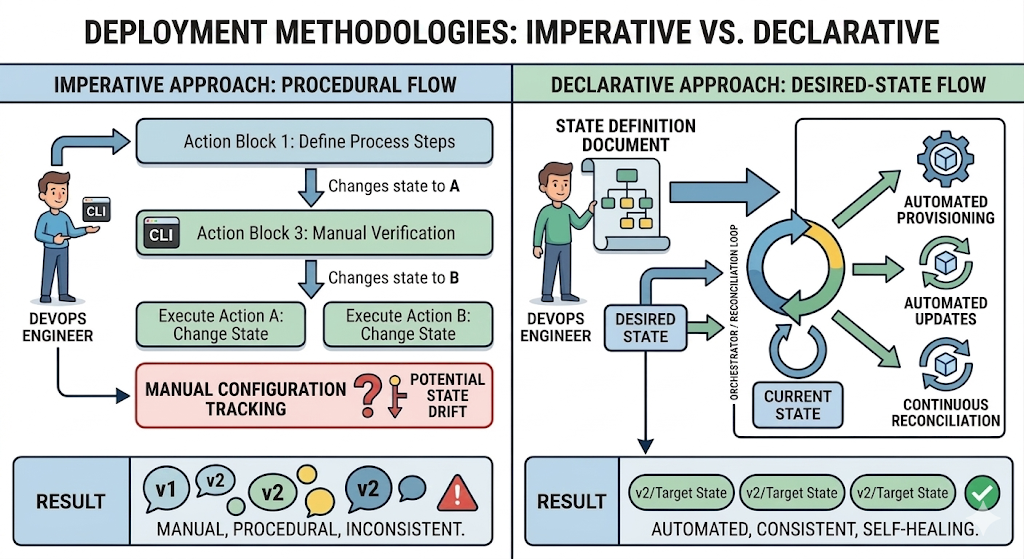
Imperative (Procedural Flow): Focuses on the manual execution of a specific sequence of commands, requiring the operator to manage state transitions directly, which increases complexity and the risk of configuration drift.
Declarative (Desired-State Flow): Uses an automated orchestrator (a reconciliation loop) that continuously compares the actual system state with a predefined state definition document. It handles provisioning and updates automatically to ensure consistent, self-healing environments.
In a very simple ecosystem, an imperative approach to deployments can be effective. For each target environment, the component promotion (the staging from Test to Production for example) can be timed by the DevOps engineer to ensure the combination of components that were tested are consistent with those that go live.
Drift, When things go wrong…
In this example, due to an oversight, the user interface was promoted to Production without the correct API version. The user interface fails in production even though it worked in test as expected, and a critical dependent API operation is now not available due to a drift.
Backend
Frontend
To add more complications, there is another version of the user interface in test now. What version of the API does it require?
This approach is not scalable, where an ecosystem has many components, and many environments, the complexity grows exponentially and the chances of manual errors leading to inconsistency increase.
There are two distinct and important concepts to cover, Declarative & Desired State.
Declarative
Declarative is a style of implementation where you describe what you want to achieve, rather than how to achieve it. In a declarative approach, you specify the desired outcome or state of the system, and the underlying implementation takes care of the details.
Desired State
Desired State refers to the specific configuration or condition that you want a system to be in. It represents the target state that you want to achieve, and it is often used in the context of infrastructure management, configuration management, and orchestration.
Orchestrated Deployment
Orchestrated Deployment is a process of managing and automating the deployment of applications and services in a way that ensures they are deployed in the desired state. It involves coordinating various components and resources to achieve the desired outcome, often using tools and frameworks that support declarative configurations.
In an orchestrated deployment, you would typically define the desired state of your application, such as the number of replicas, resource requirements, and network configurations. The orchestration tool would then take care of deploying the application according to the specified desired state, ensuring that it is running and functioning as intended.
In summary, a declarative approach focuses on describing the desired state of the system, while an orchestrated deployment is a method of achieving that desired state through automation and coordination of resources.
What does it actually look like?
There are a variety of declarative notations:
For virtual machine machines there are Chef, Salt, Puppet, Ansible, etc. and for Windows Desired State Configuration (DSC) or Active Directory Group Policies.
For containers there are Kubernetes, Docker Compose, and HashiCorp Nomad. For serverless there are AWS CloudFormation, Azure Resource Manager, and Google Cloud Deployment Manager.
For public cloud infrastructure and a broad range open-source and commercial production, Terraform has become the pseudo-standard.
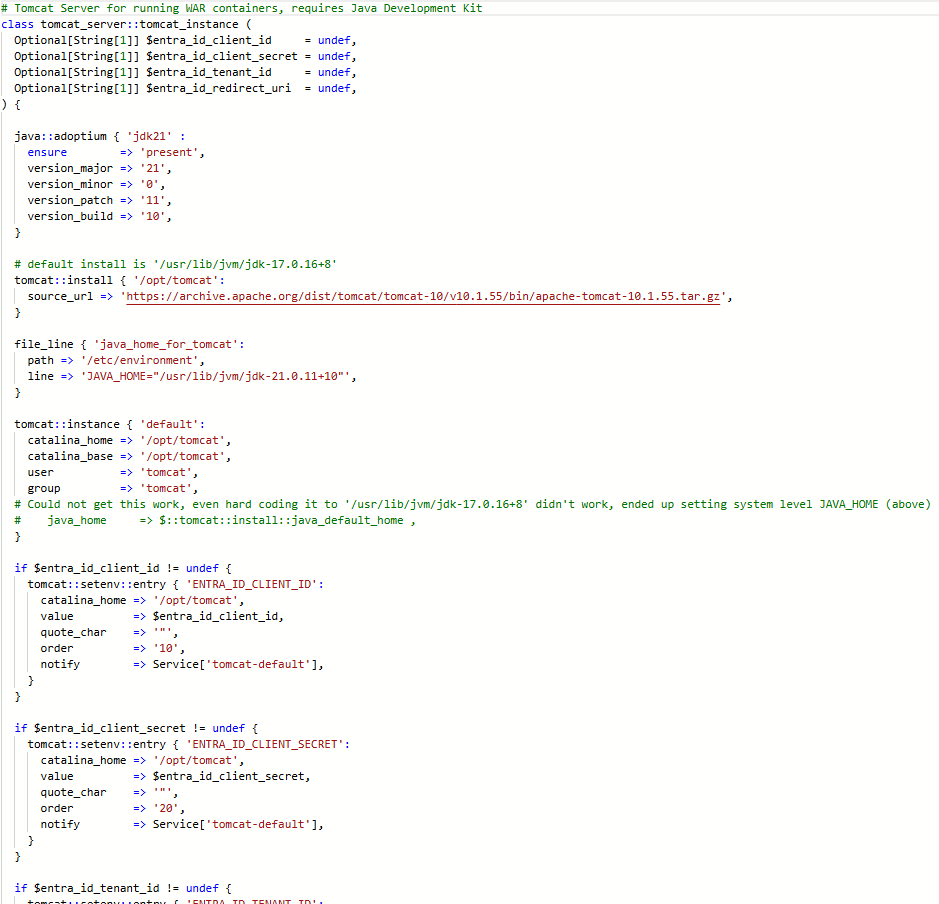
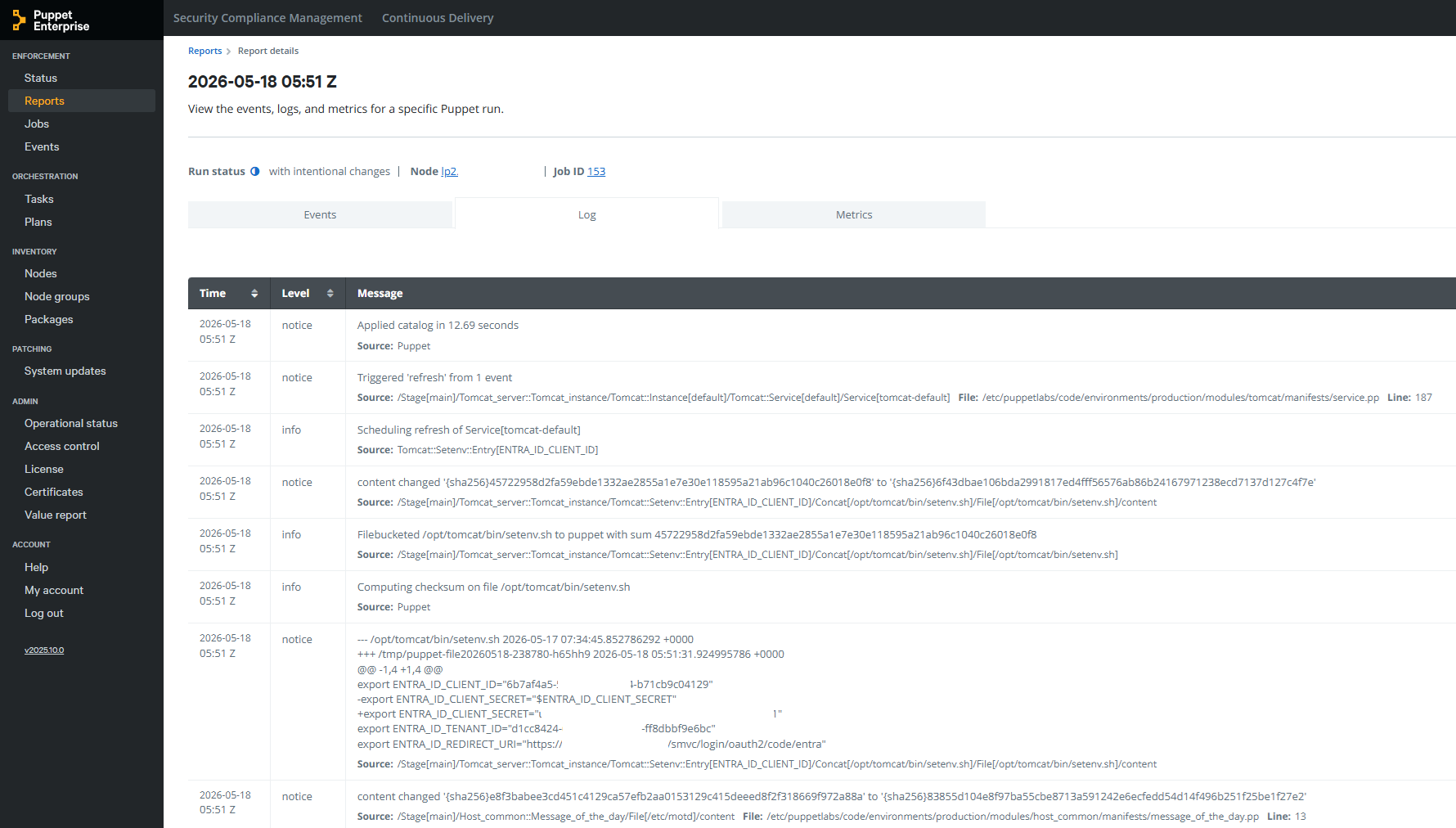
This example is Puppet applying environment variables to a Tomcat server.
Declaration
Application of Desired State
Implementation Patterns with CDAF Declarative Release for implementation examples, which incorporate intermediary tools such Ansible Tower, Puppet Enterprise and Terraform Cloud
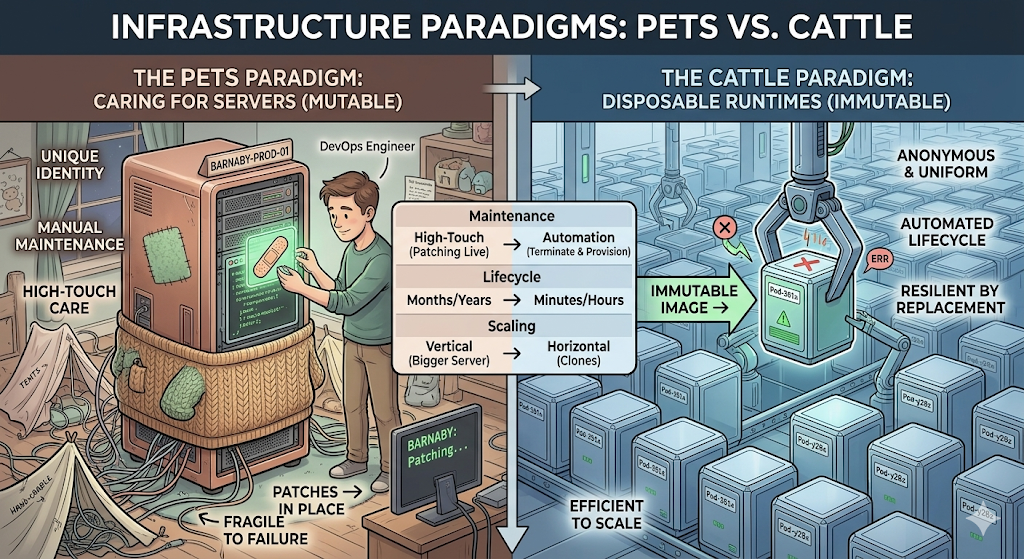
In a traditional infrastructure model, servers are treated like domesticated pets. They are given unique names, carefully nurtured, and kept alive at all costs.
Individual Identification: Every server has a distinct identity (e.g., prod-oracle-db-02 or billing-app-srv). Engineers know exactly what runs on which machine.
Mutable State: Software updates, security patches, and configuration tweaks are applied directly to the live, running server over time.
High-Touch Maintenance: When a server acts up, an engineer logs in via SSH to diagnose the issue, read local logs, and manually repair it.
The Cost of Failure: Because the server is unique, its downtime is an operational emergency. If it dies, rebuilding it exactly as it was can take hours or days, often leading to data loss or “configuration drift” (where no one is entirely sure how the server was originally configured).
Disposable Runtimes (The “Cattle” Paradigm)
In modern cloud-native architectures, infrastructure is treated like cattle or disposable machinery. Runtimes—such as Docker containers, micro-VMs, or serverless functions—are completely anonymous, identical, and easily replaced.
Anonymity & Uniformity: Runtimes do not have individual names; they have auto-generated IDs (e.g., srv-pod-x89f2). Every instance in a cluster is a perfect clone of the other.
Immutable Infrastructure: You never modify a running container or runtime. If you need to update an application or patch an OS vulnerability, you build a new container image and swap the old ones out.
Automated Lifecycle: Runtimes are designed to be ephemeral. They are spun up when traffic spikes and instantly torn down when demand drops. They might live for only a few minutes or hours.
The Cost of Failure: Disposability transforms failure into a non-event. If a container exhibits an error, becomes unresponsive, or runs out of memory, the orchestrator (like Kubernetes) immediately terminates it and provisions a brand-new, healthy replica in seconds.
Branch Plans
Alternate Branch Strategies
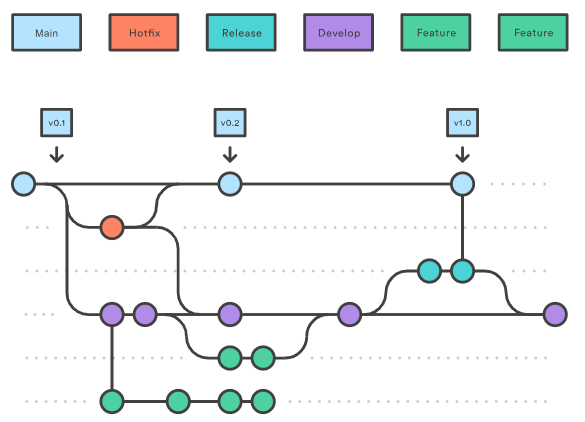
Different branch plans do not explicitly define deployment approaches, however, there are common associative methods for each plan, which are described in the subsequent pages. This page provides the baseline terminology that will be used in the remainder of this material.
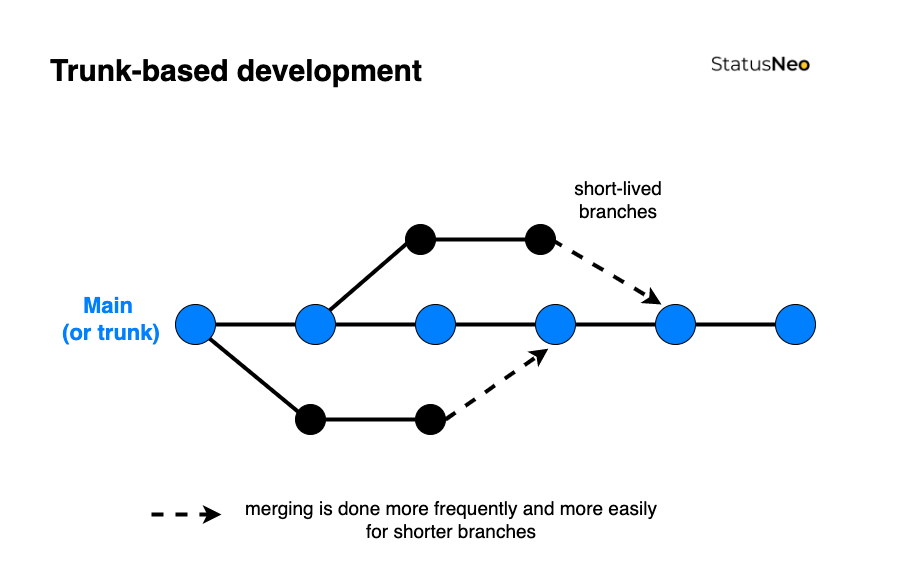
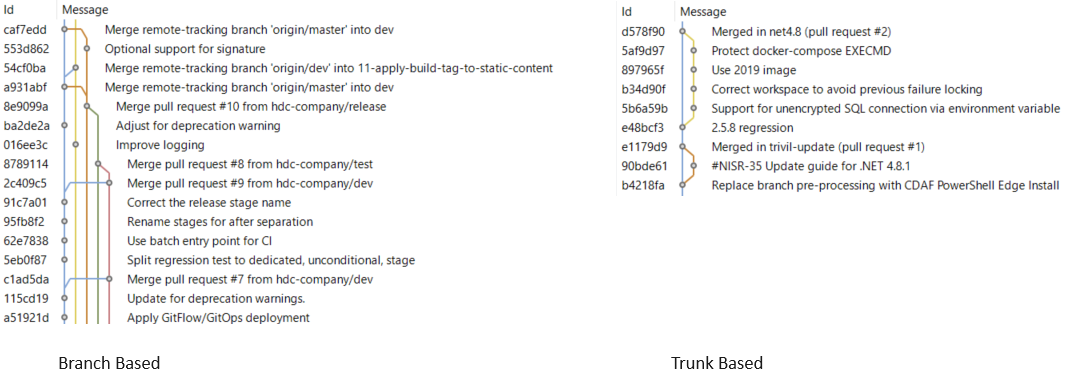
Trunk Based
Commonly referred to as Trunk Based Development. This is the simplest strategy and is commonly synonymous with Continuous Delivery (more on this to come). The only long running branch is main.
Simple Branch Plans
This branch strategy has been promoted by Microsoft, and is fundamental in their deploy process within Visual Studio. with two (or sometimes more) long-lived branches, e.g. main being used for test and release being used for production. Each additional environment requires another branch.
GitFlow
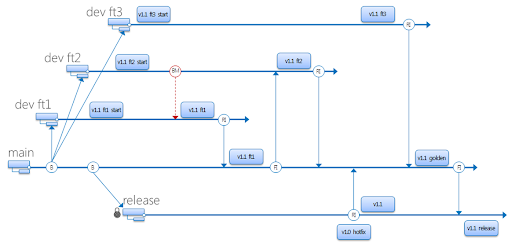
Originating from distributed source control systems, with prolonged disconnection. The majority of source control tools provided now are centralised server solutions, which obfuscate the underlying distributed architecture. GitFlow has continued, while being adjusted to use Pull Request/Merge Request to merge between branches. This typically has many long-lived branches, e.g. main, develop, release, hot-fix.
Continuous Delivery (CD) decouples the release activity from development activity. Unlike Continuous Deployment, Continuous Delivery has one or more approval gates. At time of writing, the majority of pipeline tools support approval gates, with the exception of the GitHub Free tier.
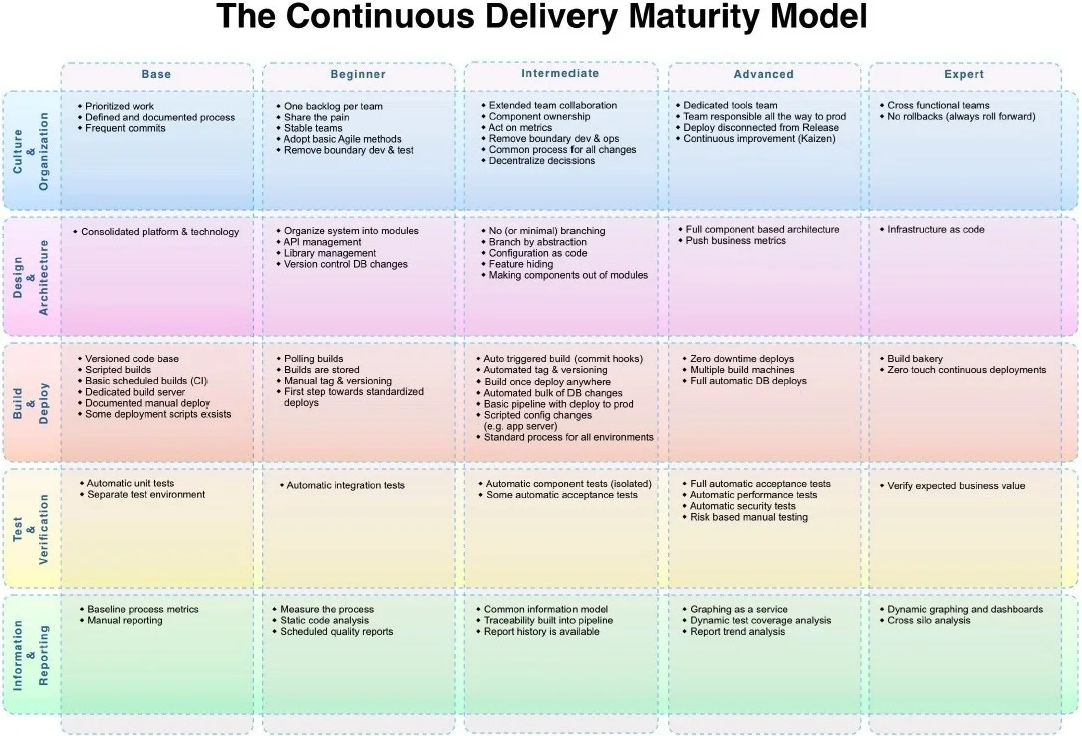
The Continuous Delivery Maturity Model
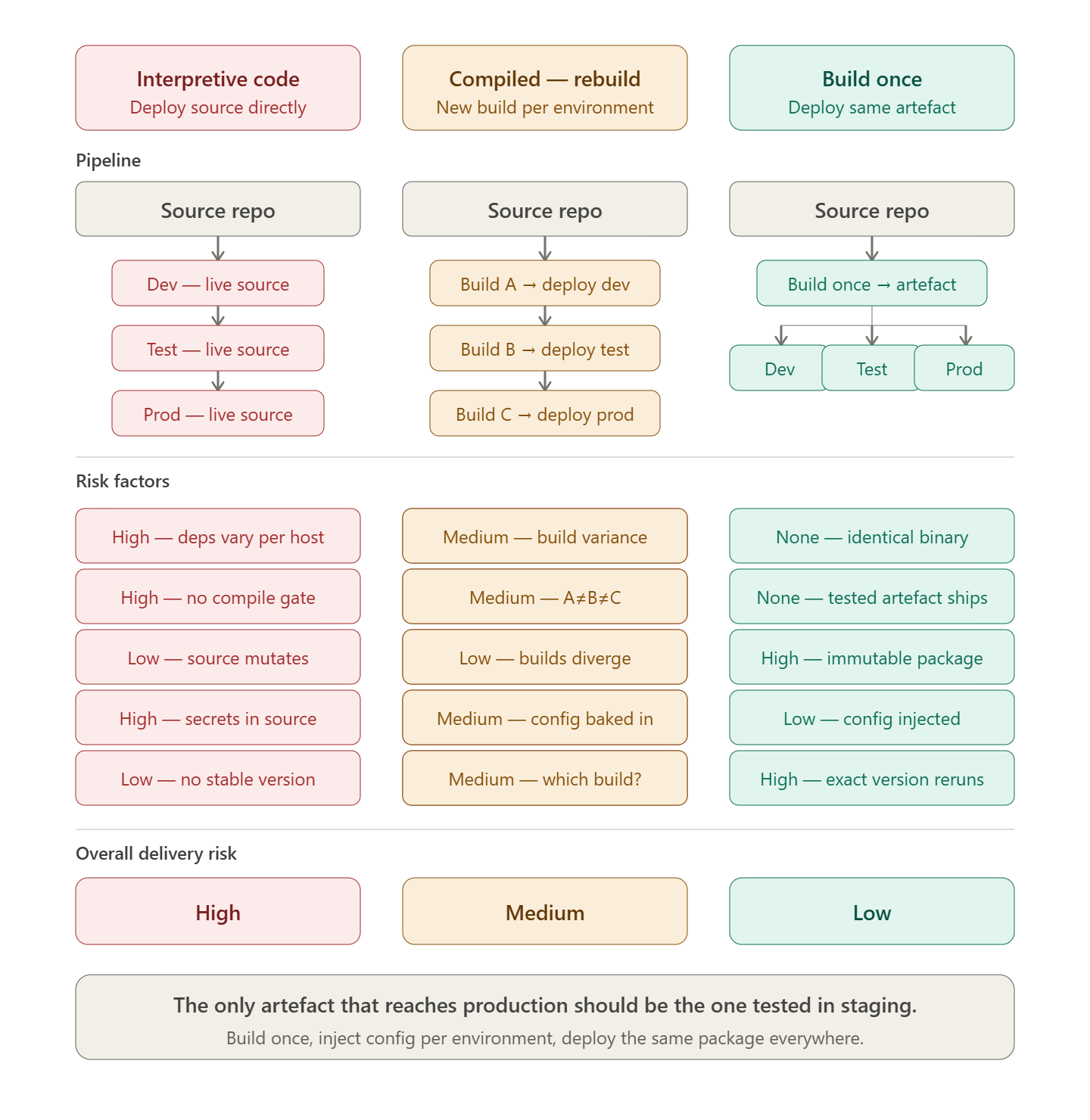
A fundamental aspect of Continuous Delivery is to build once and deploy many times. This means the output of the development process (Continuous Integration) is an artefact which can be re-used to deploy to multiple environments. The artefact represents the Release. Once this artefact is produced, the developer input is complete, and a non-development user, i.e. Test Managed or Product Owner can promote the release through various environments to production.
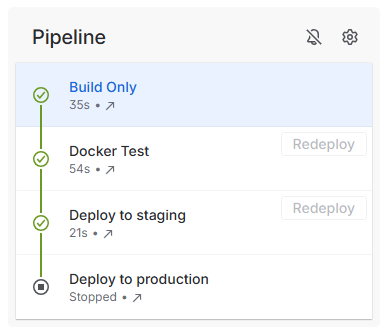
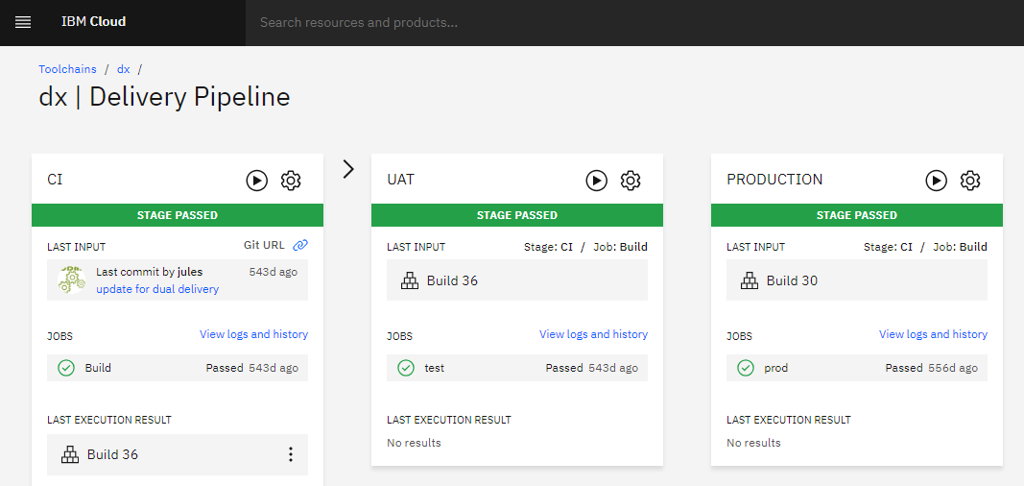
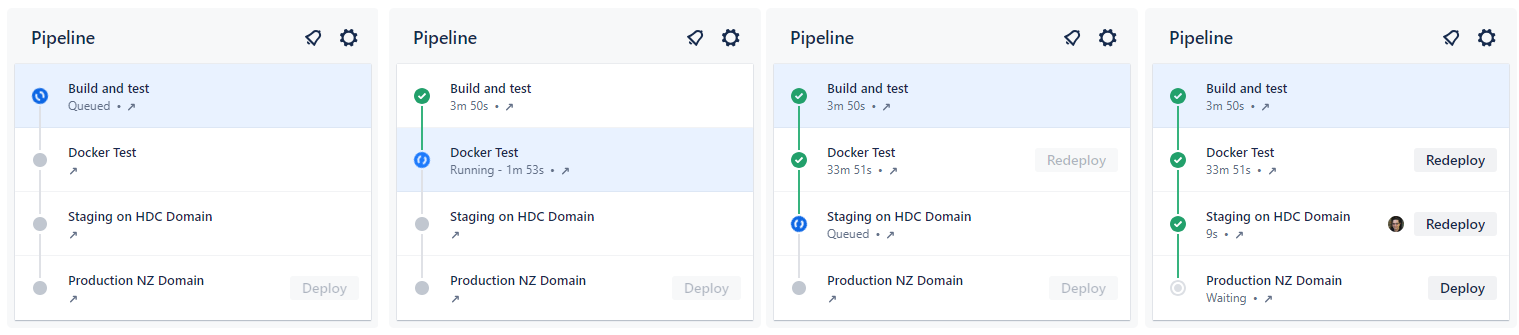
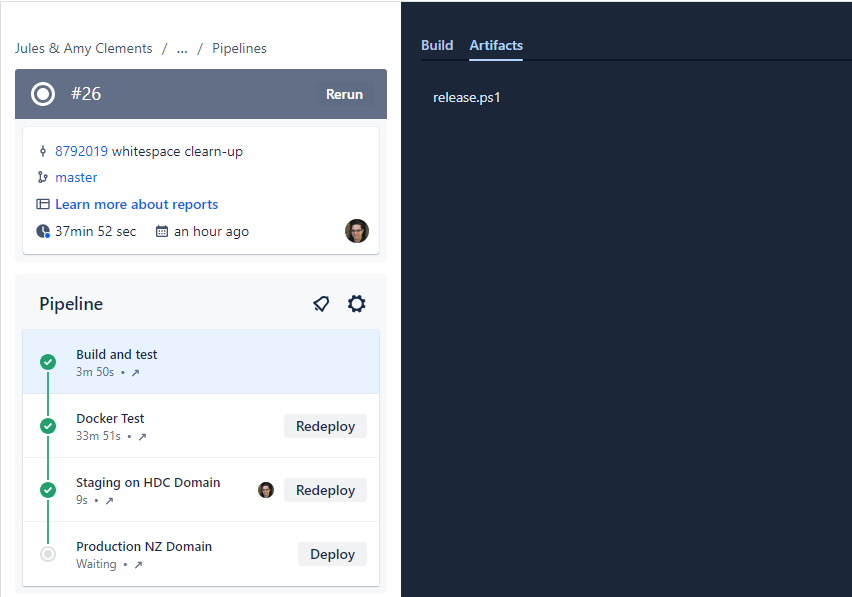
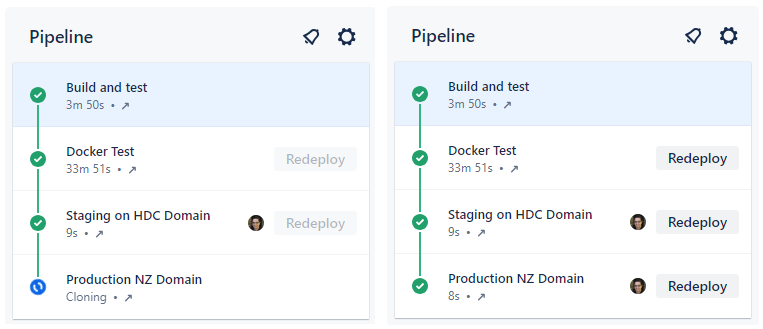
In this example, the first stage is Continuous Integration (CI) which produces the release. Each stage after that is automatically executed, with an integration test stage, and then deployment to the staging environment. After the deployment to staging, the pipeline stop, awaiting approval.
The release artefact in this example is #26, and this is re-used in each deployment phase.
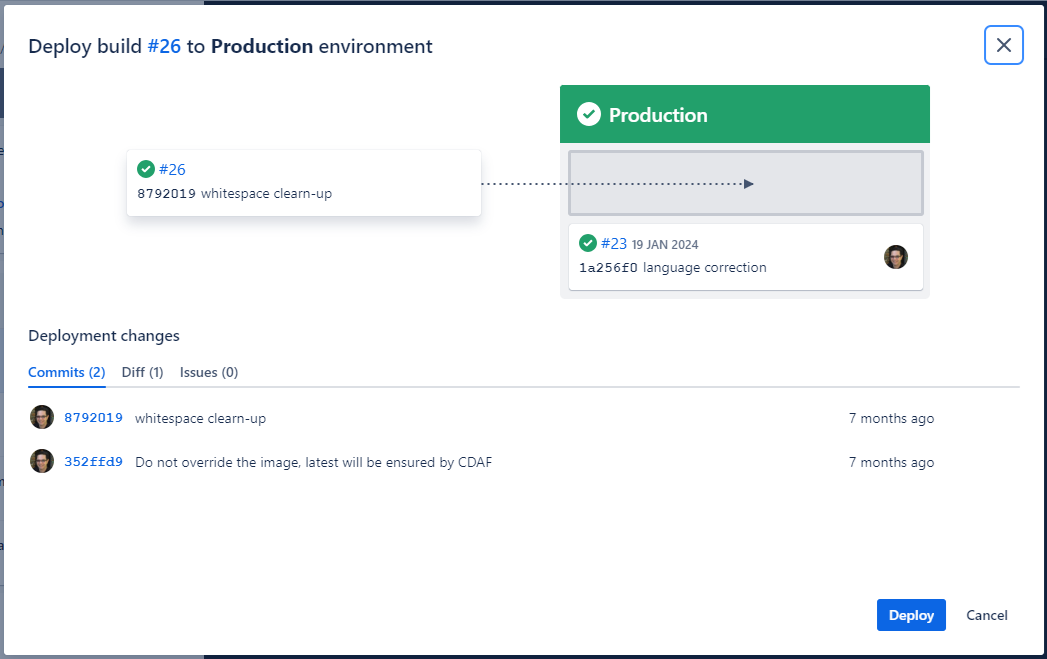
The approval gate advises the approver of what release is currently in production (#23) and what release will be deployed.
Once approved, the same artefact that was tested, is now promoted to Production, completing the pipeline.
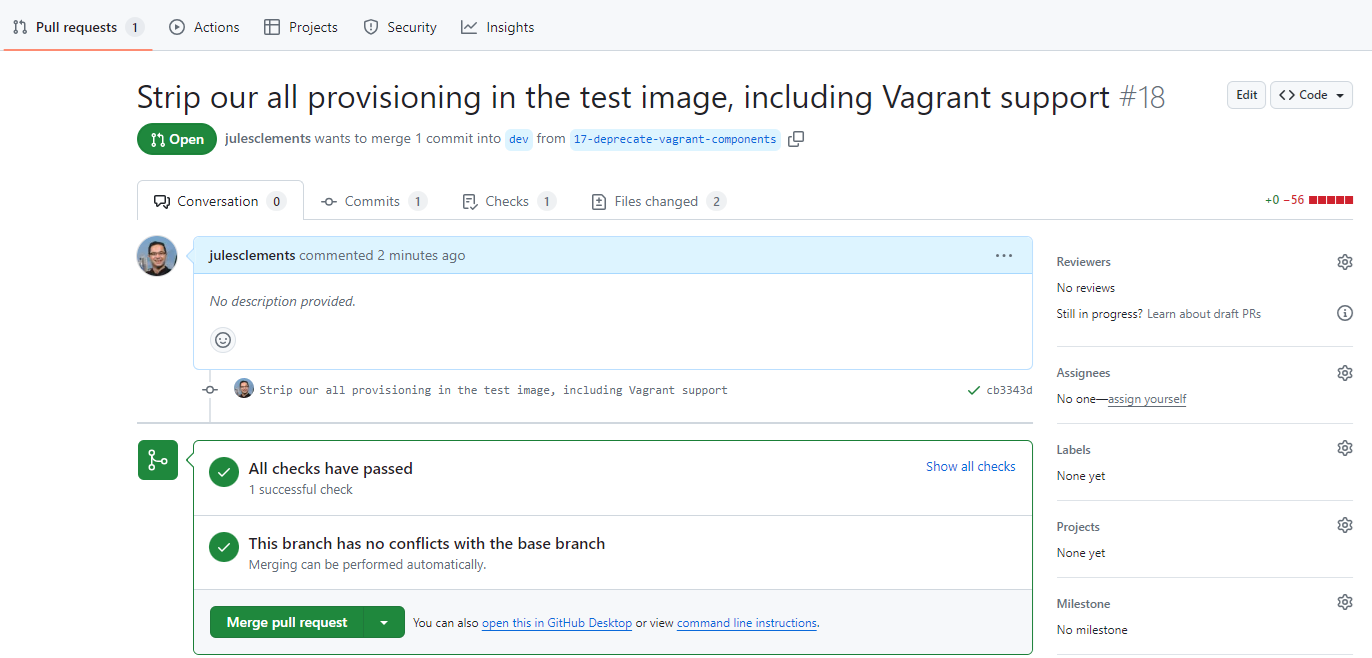
Where the pipeline tool does not support approval gating, but a review and approval mechanism is desired, the “Pull Request”/“Merge Request” can be used. The resulting approval will rebuild the solution and deliver it to the defined environment.
Branch Based Deployment
There are a variety of methods used within a branch based deployment approach, the following is a common example.
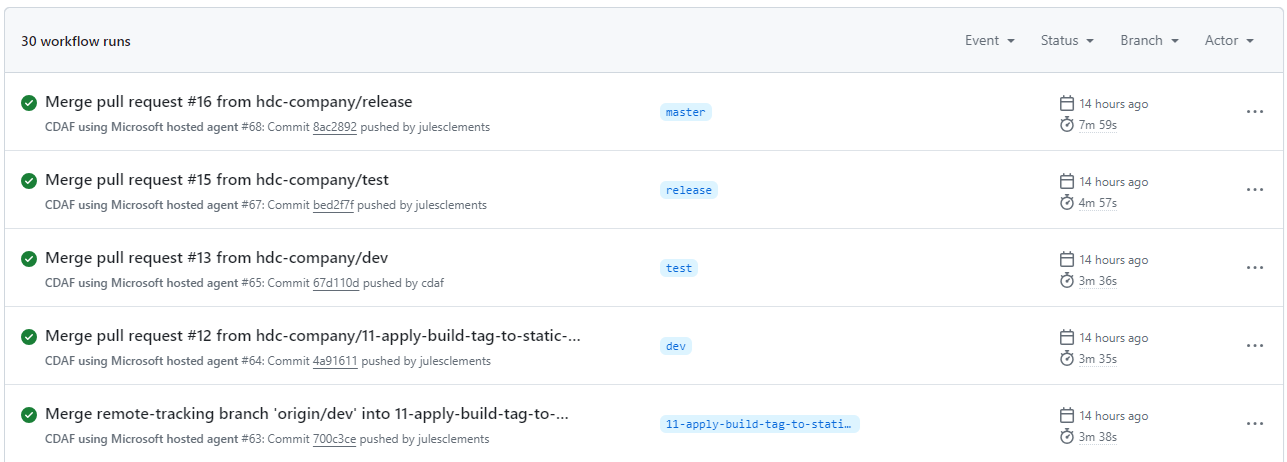
A long-living branch is defined for each target environment, in this example dev, test and release. A source of truth branch exists (main) which does not trigger a deployment.
Unlike Continuous Delivery, a separate build is created for each environment, e.g. #64 in development, #65 in acceptance test, etc.
The long-lived branches provide a high level of concurrency and flexibility to skip stages, or deploy a selected feature or fix (known as “Cherry-picking”).
To “promote” changes from feature to development, then on to test and production, a pull request is raised for each stage. In this scenario it is typically a fellow developer that reviews and approves the change, and not a business user, i.e. Product Owner.
The merge triggers the corresponding build and deploy for the target branch/environment.
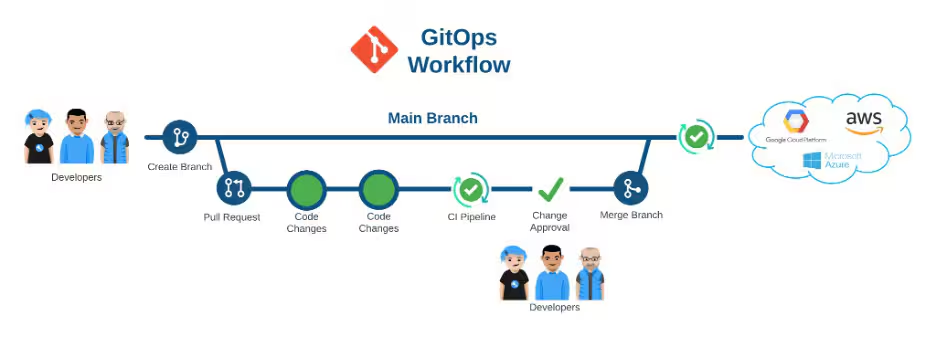
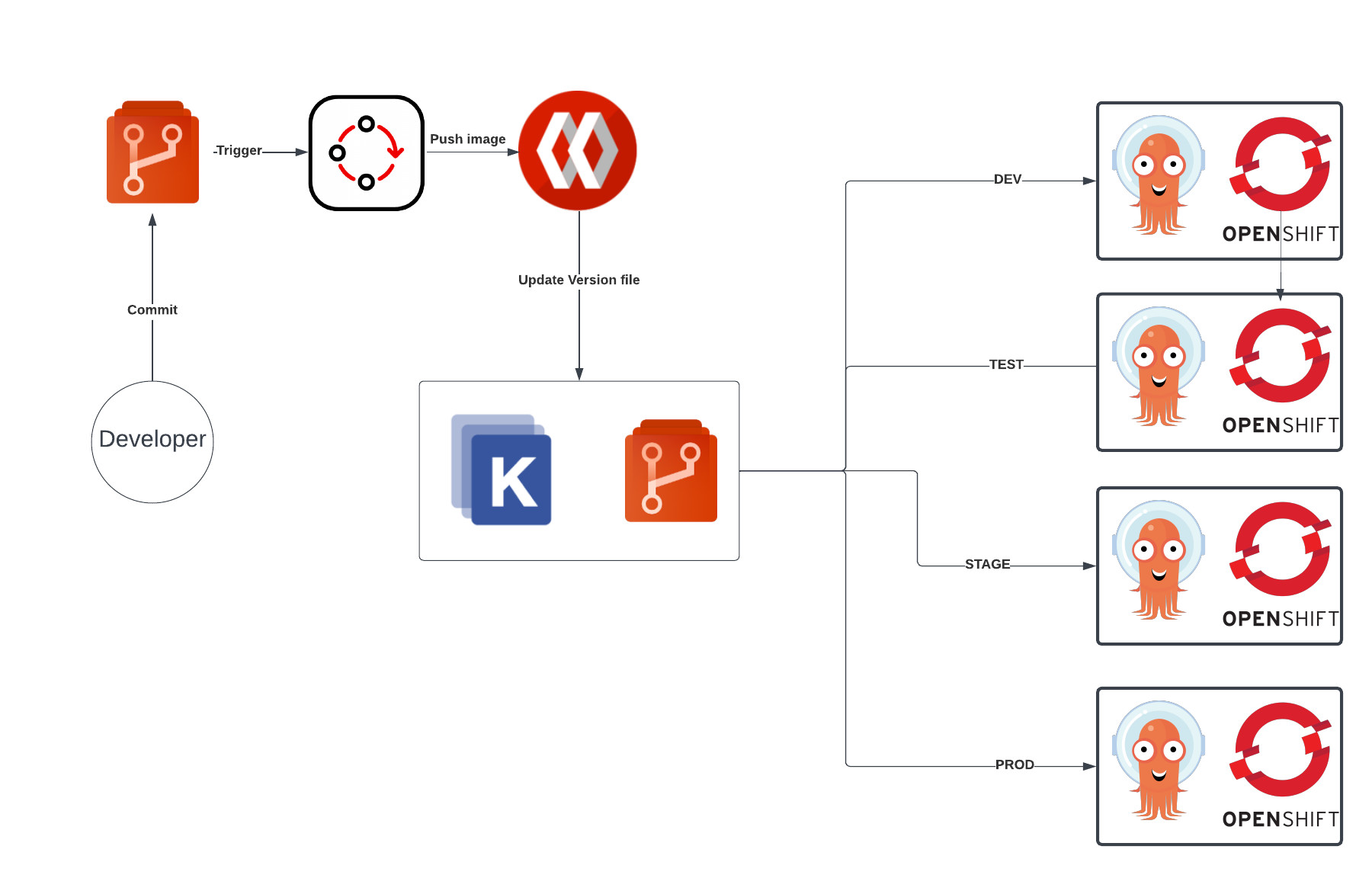
GitOps is another branch based deployment approach, however it typically does not have a Continuous Integration construct, and instead deploys directly from source control.
Branch Based Deployment Directly from Source Control
GitOps is commonly portrayed as Trunk Based
Each target environment maybe defined as a directory, but in many some cases, i.e. to provide a gating mechanism, like Branch Based Deployment, multiple long-lived branches are used.
Release
Release Definitions and Tools
A release can mean different things to different organisations. For product build teams who distribute to many customers, a release is the shippable product made available to consumers, and this is not the context of the following material.
The release process is the final stage of the software delivery pipeline, and is the point at which the software is made available to end-users or customers. The release process can involve several steps, including:
Deployment: The software is deployed to the production environment. This can be done manually or through automated deployment tools.
Testing: The software is tested in the production environment to ensure that it is functioning as expected. This can include smoke testing, performance testing, and user acceptance testing.
Monitoring: The software is monitored for any issues or errors that may arise after release.
Rollback: If any issues are detected, the release process should include a rollback plan to revert to the previous stable version of the software.
Communication: The release process should include communication with stakeholders, such as customers, users, and internal teams, to ensure that everyone is aware of the release and any potential impacts.
The release process is a critical part of the software delivery pipeline, and it is important to have a well-defined and tested release process to ensure that releases are successful and do not cause issues for end-users or customers.
Build Once, Deploy Many
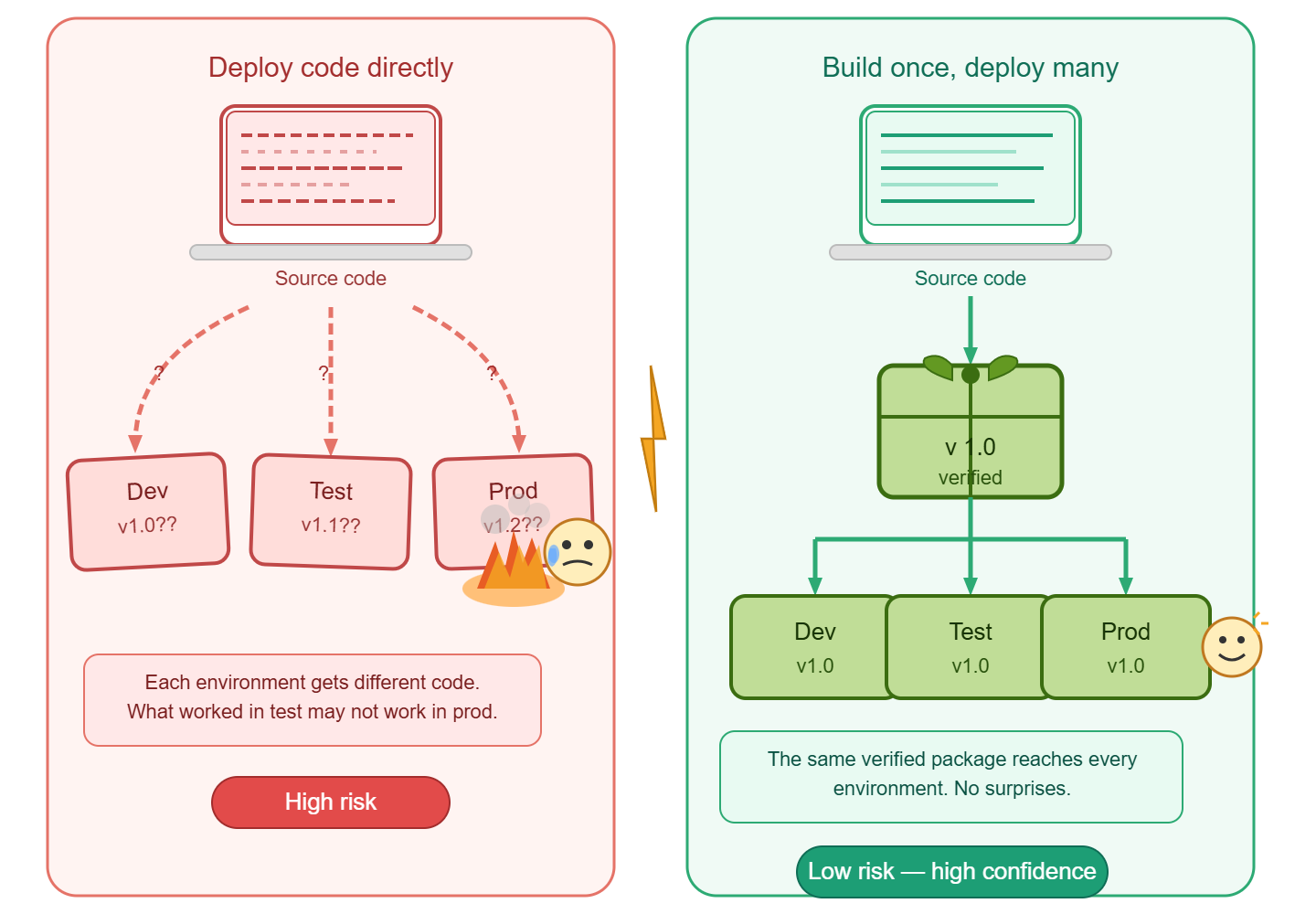
The principle of “build once, deploy many” is a key concept in software delivery and release management. It refers to the practice of building a software application or component once and then deploying that same build to multiple environments, such as development, testing, staging, and production.
Code is not released
While interpretive languages, e.g. Javascript, Python, etc. can be deployed directly from source control, this approach is not a release. Compiled languages which are recompiled for each environment are also not a release.
The release artefact is the output of the build process, and should be immutable, meaning that it cannot be modified after it has been built. This allows for consistency across all environments, as the same build can be deployed to each environment without any changes. The following tools facilitate the deployment of one or more release packages, independent to the source code that created them.
Octopus Deploy
Octopus Deploy is a dedicated release orchestration and deployment automation tool. It treats the release as a first-class concept: a versioned, immutable snapshot of one or more packages that is promoted through environments rather than rebuilt.
Key characteristics relevant to build-once, deploy-many:
Release promotion: A release is created once from a specific package version and then promoted through environments (dev → test → staging → production) without rebuilding.
Environment-specific variables: Configuration is injected at deploy time via scoped variable sets, keeping secrets and environment differences out of the artefact itself.
Deployment targets: Supports virtual machines, Kubernetes clusters, cloud services, and on-premises infrastructure from a single release definition.
Runbooks: Operational tasks (database migrations, smoke tests, rollback scripts) can be defined alongside deployments and triggered as part of the release pipeline.
Audit and traceability: Every deployment records who approved it, when it ran, what package version was used, and what the outcome was — supporting compliance and rollback decisions.
Octopus separates the concern of building (handled by your CI tool) from releasing (handled by Octopus), which aligns directly with the principle that the artefact tested in staging is the artefact shipped to production.
Azure DevOps Releases
Azure DevOps Releases (part of Azure Pipelines) provides a pipeline-based release orchestration layer that sits downstream of the build pipeline. A release definition consumes build artefacts and controls their progression through a sequence of stages.
Key characteristics relevant to build-once, deploy-many:
Artefact linking: A release is triggered from a pinned build artefact — the same compiled output is carried through every stage without rebuilding.
Stage gates and approvals: Pre- and post-deployment conditions (manual approvals, automated quality gates, scheduled windows) control when promotion to the next environment occurs.
Variable groups and Azure Key Vault integration: Environment-specific configuration is managed through variable groups and secrets stored in Key Vault, injected at deploy time rather than baked into the package.
Deployment strategies: Supports rolling, blue-green, and canary deployment patterns natively, enabling controlled rollout and straightforward rollback to a previous release.
Integration with the Azure ecosystem: Native connectivity to App Service, AKS, Azure Functions, and other Azure targets reduces the configuration overhead for cloud-hosted workloads.
Azure DevOps Releases is particularly well-suited to organisations already invested in the Microsoft toolchain, providing a governed promotion path from a single build artefact across all environments.
Implementation Patterns with CDAF
Declarative Release for implementation examples, which incorporate intermediary tools such Ansible Tower, Puppet Enterprise and Terraform Cloud
Release Trains for implementation examples, which incorporate Octopus Deploy and Azure DevOps Release feature
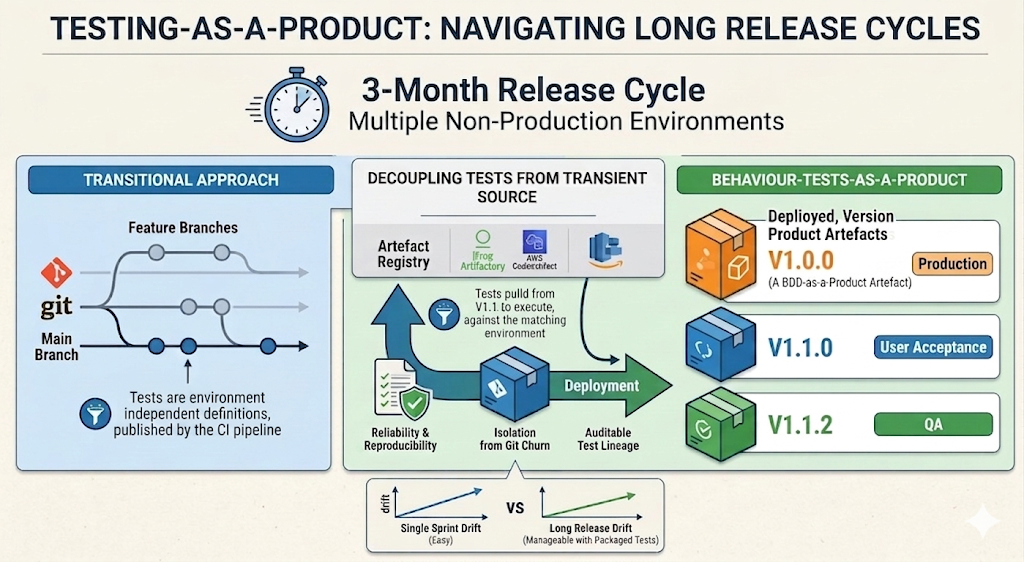
While build-once/deploy-many software releasing is well established, test automation is commonly executed directly from source, sometimes with branches to cover variations. As an alternative, I encourage packaging (versioning) test automation. As a reusable product, tests can be re-run from your artefact registry without exposure to the transient nature of source control.
Package Management
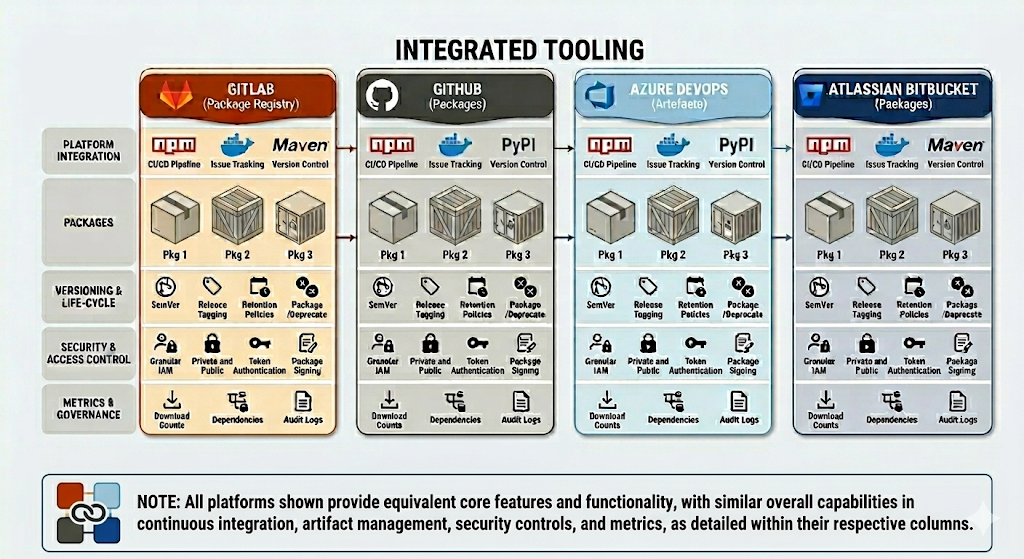
A stand alone package registry can be used as described above, or if using an integrated tooling offering, the registry included can be used.
Stability Tests
With the versioned automated test product, the package can not only be consumed within delivery pipelines, it can also be used for scheduled tests, for example nightly tests. While new features and corresponding tests are progressing through the delivery lifecycle, the nightly tests can still consume a known version with confidence.
Implementation Patterns with CDAF
One of the key features of CDAF is that packages are abstracted from the implementation ecosystem, e.g. NodeJS, .NET, Python, etc. and a single, self-extracting script is the output of the CI process. It is this which is published in the registry, and executed by reference to perform automated tests.
Note: if your automated test product is a container image, the release package script will provide a wrapper to execute the container based test and capture the output.