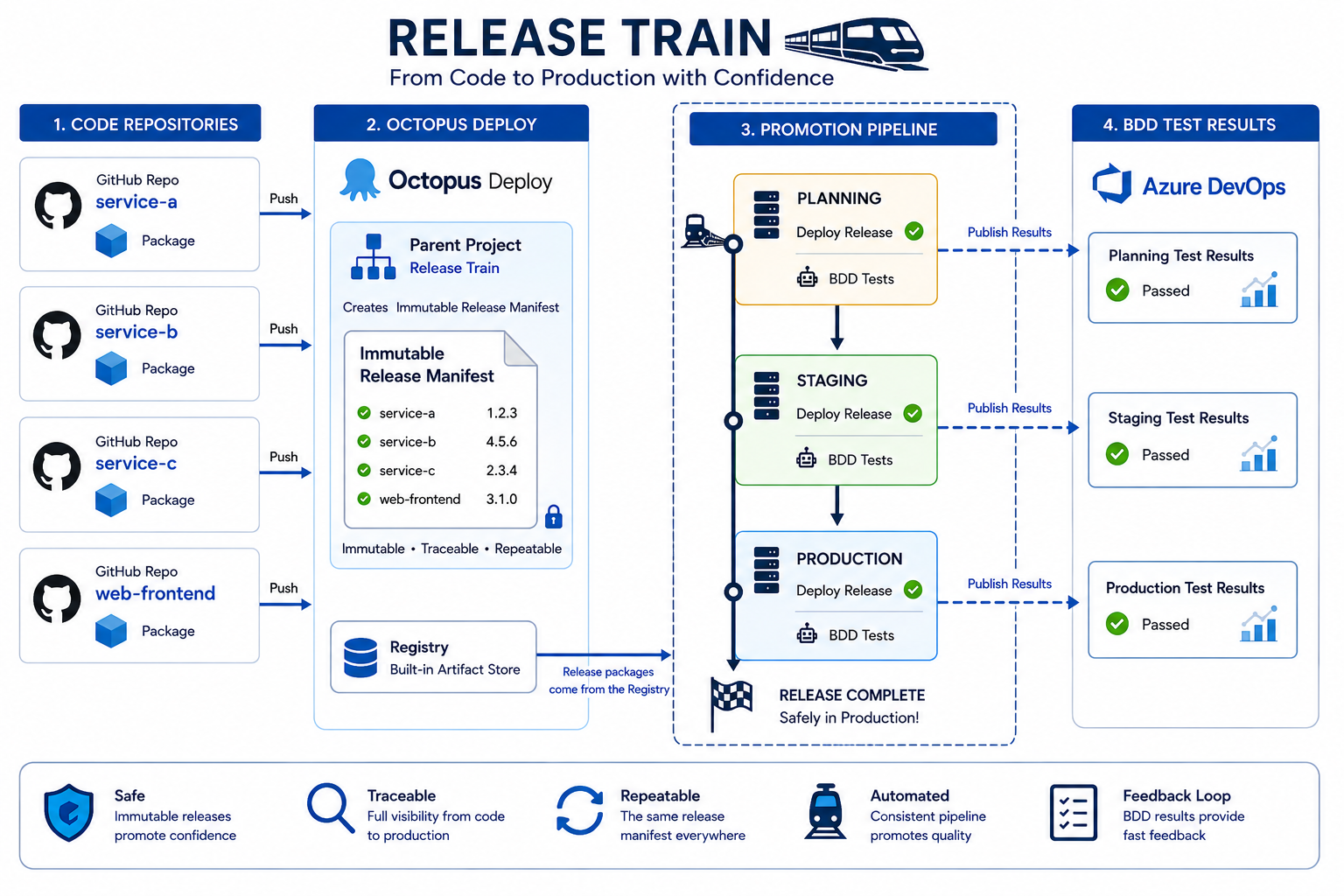
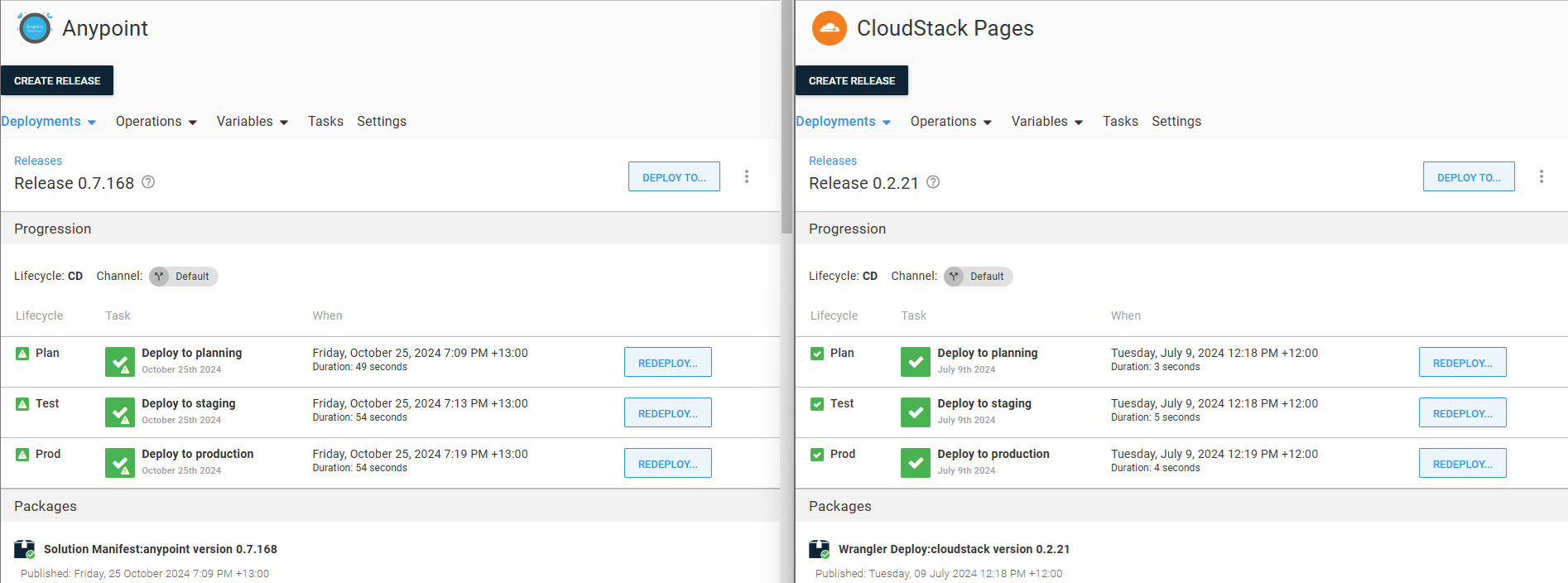
Octopus Deploy is a dedicated release orchestration tool which did not have build capabilities and historically did not natively integrate with source control, instead it focusses a registry to which artefacts can be pushed.
By decoupling from source control, Octopus provides an idea release train platform as it’s core focus is on releasing deployments. This also allows the independent orchestration of disparate tools, providing visibility of release outcomes to business a audience.
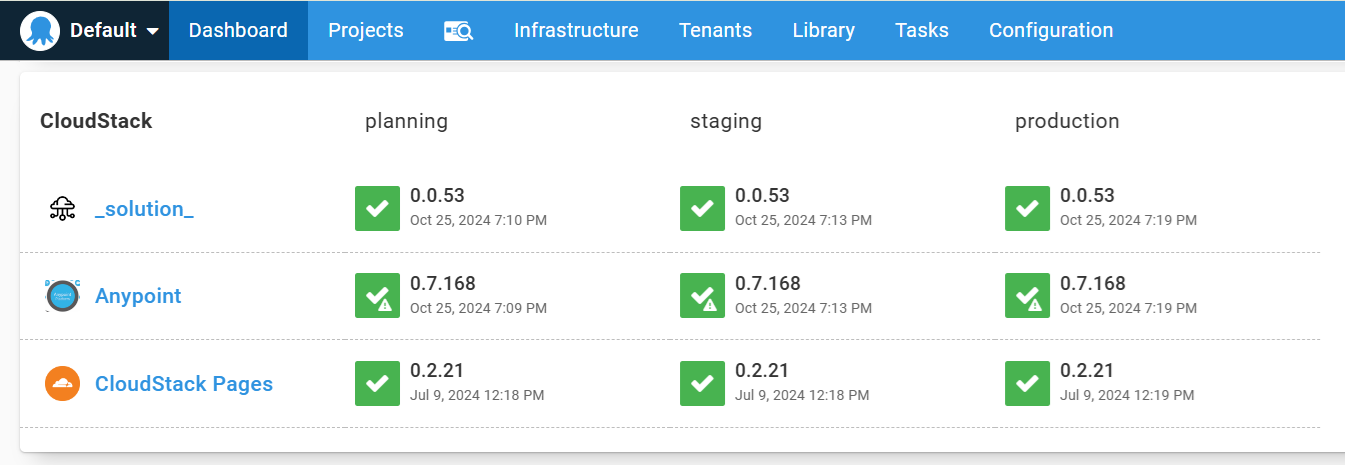
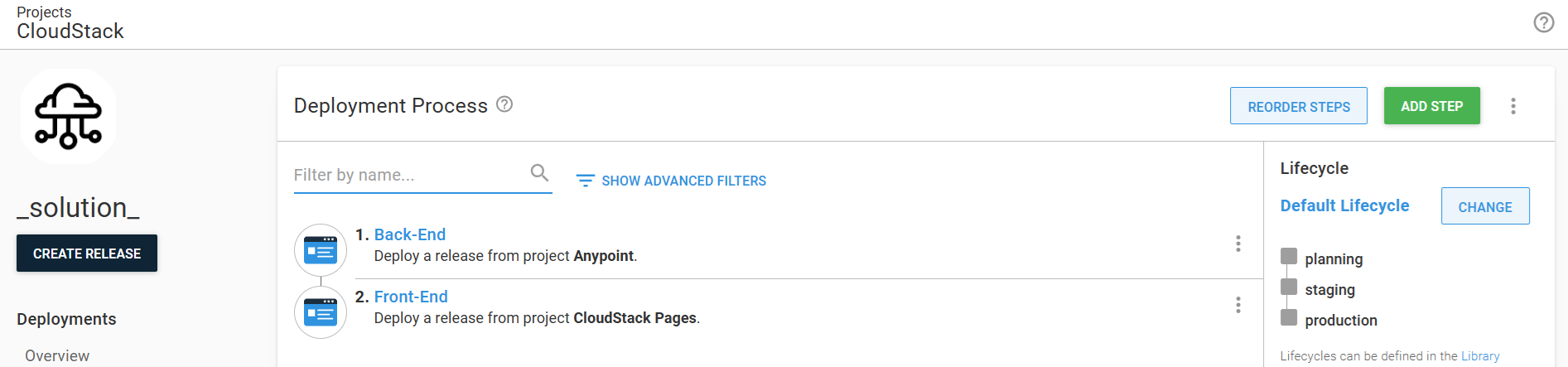
By using a solution project, all the component projects can be orchestrated as a single manifest, i.e. a release train.
The following scenario is a stack which comprises a customer-facing application (React) front-end and Platform-as-a-Service (Mulesoft Anypoint) back-end.
The back-end deployment is itself an authoritative release solution with a source-driven manifest (see Custom Desired State Management Solution). The client will retrieve the static content from the content delivery network (CloudFlare).
graph TD
  client["🌐"]:::transparent

  subgraph cf["CloudFlare"]
    react-a["Static Content"]
  end

  subgraph ch["CloudHub"]
    patient["Patient API"]
    Admissions["Admissions API"]
  end

  client --> react-a
  client --> patient
  patient --> Admissions

classDef external fill:lightblue
class client external

classDef dashed stroke-dasharray: 5, 5
class cf,ch dashed
Octopus creates a release whenever either the state management or user interface packages are pushed, but this is not deployed into test until the release manager approves. The API construction and registration with AnyPoint exchange is not described here, this is treated as a prerequisite, see Custom Desired State Management Solution for a detailed breakdown of that process.
graph LR

  subgraph "Patient API"
    Rbuild["Build"] -->
    Rtest["Test"] -->
    Rpublish["Publish"]
  end
  subgraph "AnyPoint Desired State Management"
    Pbuild["Build"] -->
    Ptest["Test"] -->
    Ppublish["Publish"]
  end
  subgraph "Admissions API"
    Sbuild["Build"] -->
    Stest["Test"] -->
    Spublish["Publish"]
  end
  subgraph "CloudFlare Pages"
    Abuild["Build"] -->
    Atest["Test"] -->
    Apublish["Publish"]
  end

  subgraph Release
    TEST:::release
    PROD:::release
  end

  store1[(Anypoint Exchange)]
  store2[(Octopus Package Registry)]

  Rpublish --> store1
  Spublish --> store1
  Ppublish --> store2
  Apublish --> store2

  store1 --> TEST
  store2 --> TEST
  TEST --> PROD

classDef release fill:lightgreen
As an intermediary, Octopus provides release gating, orchestration and an overview of the stack components, and what versions have been promoted to which environments.
Parent Project
The parent project does not perform any deployment activity itself, it serves as the orchestrator of the child projects, providing gating and sequencing.
Child Projects
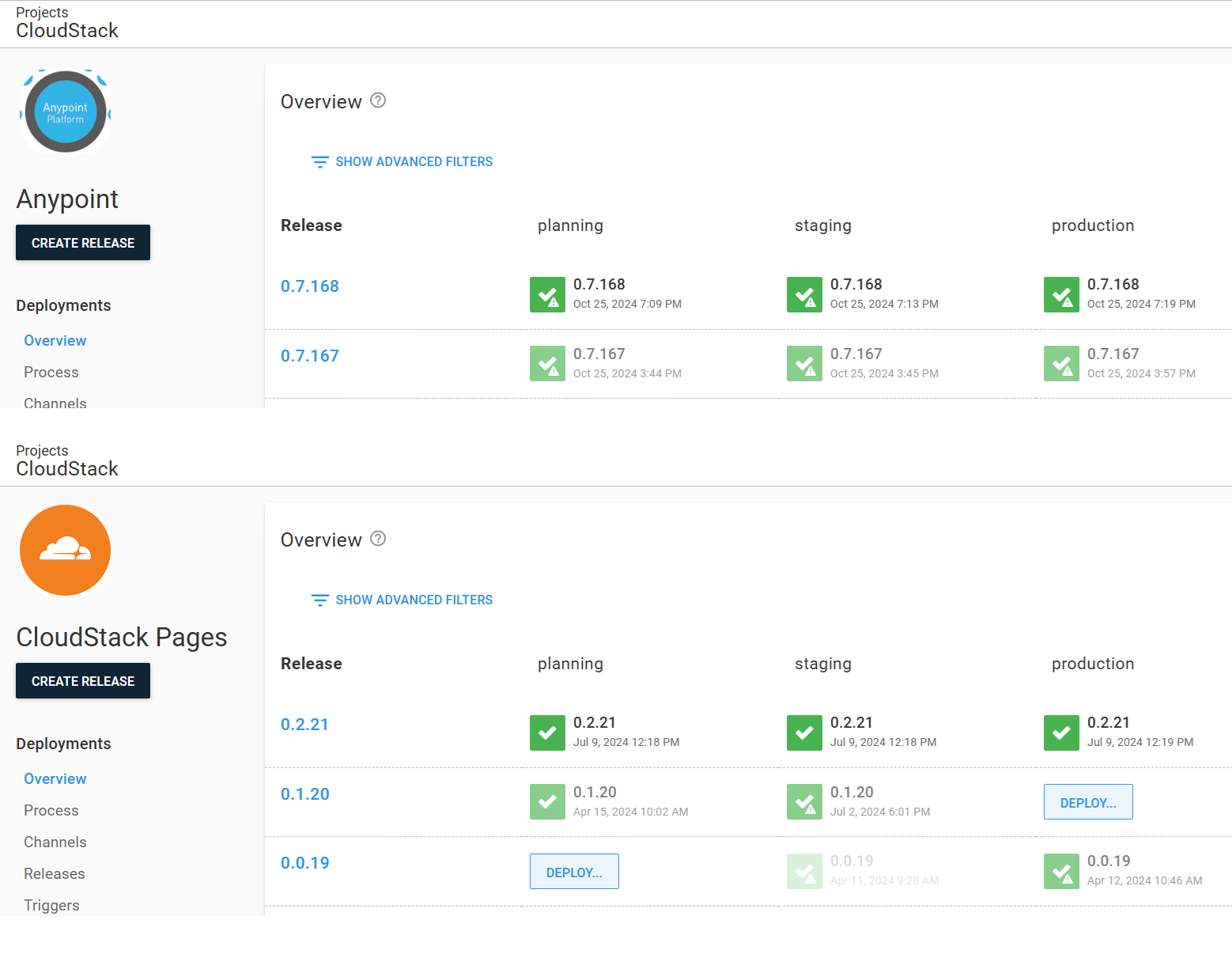
The child project, use the same template process, but each has the release packages that have been build to perform their technology specific deployment process.
Component Independence
The approach above does offer the ability to independently promote or roll-back a child component. This can be beneficial for hot-fixes, however, it is discouraged as it breaks the stack alignment principles of the release train.
The core principle of all the examples in this material is the production of a self-contained, immutable release package. This provides loose coupling with tool chains and re-usability for development environments (see Realising the Feedback Loop).
While Octopus provides a wide range of deployment mechanisms, as a release orchestrator, each child project has the same process, executing the release package for each component against the target environment.
Delivery Lifecycle
Octopus orchestration is called a lifecycle, which is a re-usable pattern. Each child item can use the same lifecycle because the deployment launch process is the same.
While the launch process is the same, each child components underlying technologies can be very different.
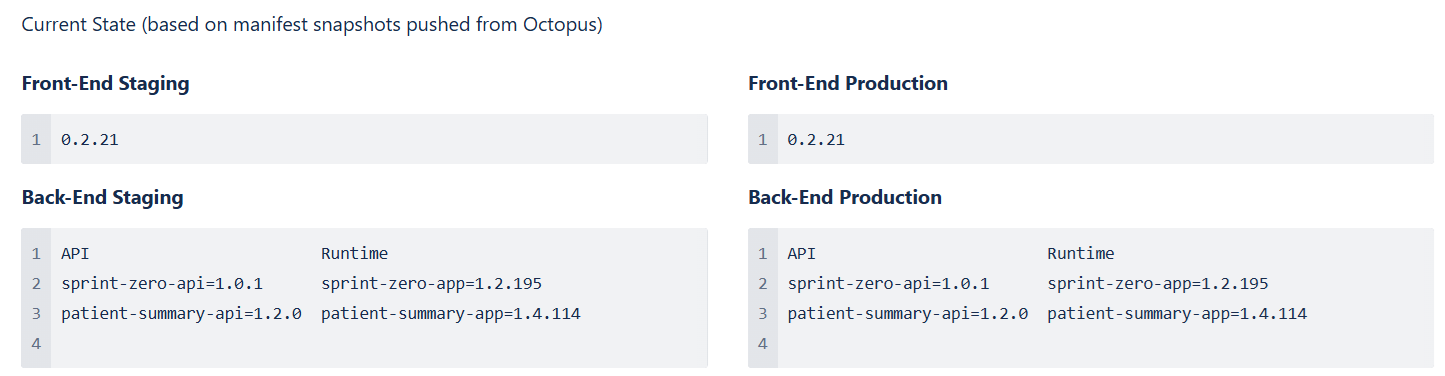
After each environment deployment is successful, a Confluence page (one per component/environment) is updated, capturing release details. This provides visibility outside of the toolchain, which is easier to access by business users such as test managers and product owners. Using the content include macro, these pages can be merged.
when using containers, the package pushed to Octopus does not contain the software solution itself, but instead, simply helper scripts to managed the download and instantiation of containers from the container registry.
graph LR

  subgraph "Component 1"
    Rbuild["Build"] -->
    Rtest["Test"] -->
    Rpush["Push"] -->
    Rpublish["Publish"]
  end
  subgraph "Component 2"
    Pbuild["Build"] -->
    Ptest["Test"] -->
    Ppush["Push"] -->
    Ppublish["Publish"]
  end

  subgraph Release
    subgraph TEST
      rcontainer
      pcontainer
    end
    PROD
  end

  store1[(Container Registry)]
  store2[(Octopus Package Registry)]

  Rpush --> store1
  Ppush --> store1
  Rpublish --> store2
  Ppublish --> store2

  store2 --> TEST
  store1 --> rcontainer
  store1 --> pcontainer
  TEST --> PROD

classDef release fill:lightgreen
class TEST,PROD release